Welcome to ClubRunner's BlogSpot


Welcome to ClubRunner's BlogSpot - the place to stay on the pulse of hot off the press news updates about product developments, service announcements, local events and so much more!

Also, you can initiate discussions and share information among fellow ClubRunner users.

Your feedback is always welcome and necessary to help us make ClubRunner better. We want to know what you like, what you don't and what's on your wish list. Please let us know how we can enhance our service.

Saturday, May 16, 2015

Tip of the Week: Bulletin Greeting

Did you know that you can customize the email greeting message that appears on your bulletin for your various recipient lists? 

Whether you are sending your bulletin to members, prospective members, club sponsors, event attendees, or anybody else that makes up your recipient list, you can customize the greeting message that is displayed on top of your bulletin to relate to your audience. With mail merge tags, you can also customize your greeting by including options such as sender related information such as name, club name or recipient related information such as recipient name, nick name, spouse name, club name and much more.

To create a custom bulletin greeting for each recipient group, you first have to ensure that you have created different "bulletin groups" for these lists. A Bulletin Group is a way for you to create and track the different sets of recipients that will receive your bulletin (ex: members, prospective members, etc.). Once you have created your groups, you can design your own custom bulletin for each as well with a different look and feel as well as content. To learn more about how to create Bulletin Groups, refer to the following help article on our knowledgebase.

Within each group, you can then customize your greeting message so that is always relevant to the recipient. To do so, navigate to your Bulletin Group page and simply add your message within the email greeting editor. Great for reminding your readers about an upcoming deadline, informing them about events. meeting related news and more!

For more helpful hints on Bulletin Designer 3.0, check out our knowledgebase.

Monday, May 11, 2015

Tip of the Week: Volunteers

Did you know that you can now make a copy of a Volunteers sign up list for future events?

You asked for it, and we delivered! Within the Volunteers 3.0 module, you now have the ability to duplicate a Signup list rather than creating it from scratch again.

All the information within the list except the assigned volunteers are copied to your new list - which means, your defined groups, tasks, dates, time slots and settings are all carried over! You then have the ability to edit the Signup list details from the edit screen to name your new list, define the start and end dates, link a Signup List Chair, etc. To duplicate, simply click on 'Copy' link under the Actions column on the Signup Lists page. Your new list will then appear on the main Signup Lists page.

There are still lots of updates coming your way! Please continue to send us your suggestions and feedback by emailing us at feedback@clubrunner.ca.

Saturday, April 18, 2015

Introducing ClubRunner's Attendance Module 3.0 (Beta)!


Attendance 3.0 BetaWe're pleased to announce the release of our all-new Attendance 3.0 Module in beta! Based on the feedback we've received over the years from our Champions and Early Access Participants, we designed this new module from the ground up to cater to the unique attendance needs of each club.
Besides more advanced tracking functions, Attendance 3.0 gives you the ability to:
  • Bank and track make-ups for members
  • Auto-assign a makeup from the members' pool for any meetings they miss
  • Add multiple makeups to make data entry even faster
  • Track attendance for honorary members
  • Record guests and other visitors
  • Customize attendance rules based on member type (excused vs. exempt)
  • View attendance history and performance in dashboard view
  • Open up your own past meeting records to recalculate attendance
  • and much more!
Available through the main menu on the Admin page, to navigate to the Attendance module, simply click on the Attendance 3.0 (Beta) tab on the top menu. Note that only those clubs on Version 3.0 have access to preview Attendance 3.0 and you will be able to transfer your data from the current Attendance module to Attendance 3.0 using the built-in migration tool. Refer to our knowledgebase for help articles and FAQ's to get started with using this module. 

Friday, March 27, 2015

Maintaining Your Rank on Google with Version 3.0

As of April 21, 2015, Google will be changing their search algorithm so that mobile-friendly sites rank higher in search results. If your club or district is currently on Version 2.0, this change will have a significant impact on how your website ranks online. Further, with a Version 2.0 website, you run the risk of not being included in search results made through mobile devices. 

To read more about this upcoming change, please click here.

Version 2.0 is built on what is now an older architecture which we are going to stop supporting in the coming month, which is why we strongly advise all clubs and districts that have not yet switched to Version 3.0 to do so. Completely redesigned from the ground up, Version 3.0 boasts many new features and enhancements including a mobile-friendly experience, new Rotary branded website and bulletin themes, customization options, flash support and more.  

We can help!

If you are unsure of which version your club is currently on, please contact our support team. If you prefer that we switch your club to Version 3.0, we'll be happy to do so at no charge. There is no difference in price between the two versions, and switching does not affect your ongoing current events, activities, or admin duties. 

To learn more about how to switch, we invite you to view our help guide which gives you easy to follow step by step instructions, though, once again, if you prefer our team do this for you, simply contact us with the name of your club and we'll be happy to do so.

Don't risk invisibility! 

Friday, March 20, 2015

Best Practices for Bulletin Content

We've said it before! Your club bulletin is an excellent tool for engagement with both your own membership and the world at large. How can you ensure that your newsletter doesn't get caught by spam filters and that all recipients see the same formatting? We often get asked for tips and tricks and some best practices to keep in mind for bulletins, which is why we thought we'd share our first of many articles on the topic and start with what we're asked quite often.

Videos and Animations: Why cannot we add videos in our newsletter?

This is a question we get asked a lot. While many desktop and web-based email clients used to support video in email, as security tightened and spam became a bigger problem, video support became a thing of the past. The following items cannot be sent in the body of an email:
  • Videos
  • Flash
  • Quicktime
  • Windows Media
  • Java Applet
  • HTML5
However, here are some options you can use instead of video:
  • Use animated gifs
  • Take a screenshot of the video and then make a clickable link to where the video file is stored
Forms in Bulletin: We want to collect feedback and want to add a form. Why can't we?

Most email clients consider email forms to be a security risk. While some email clients simply warn you of potential  danger, others outright disable the forms. Below items are not permitted when sending an email:
  • Cannot use Forms (ex: < form >, < select >, < input >, etc.)
As a result, we recommend using a link to the form so the viewer can just click on the link and be taken directly to the form to submit.

Choosing a Bulletin Font: What font and font size is recommended?

When you are sending an email message, it's important to use a font that is clear and easy to read. Be sure to make your font large enough so that the reader doesn't have to squint to read your message, but not so large that the reader has to scroll a long way down to read all the message.

It's also important to use a plain font, because like we mentioned earlier, not all email programs view messages the same way. You don't want the content of your message to be jumbled or strangely formatted because the reader's email program didn't view the font the same way yours did.

Basic fonts like Arial, Verdana, and Times New Roman work well. Depending on how much content you have in your email message select a 10 or 12 point font size for legibility.

Have tips of your own you'd like to share? Comment below! We'd love to hear them.

Monday, March 9, 2015

Updates to the Attendance 3.0 (Beta) Module!

Many of you are already aware of our upcoming Attendance 3.0 module, and in fact many of you have already seen this module come to life by participating in our Early Access Preview! While in it's Early Access phase, we've made a number of changes and updates based on your feedback.

Here are just a few updates recently made, with many more on the way.

Did you know you can now report makeups to closed meetings & against events?

As of our latest software update, you can now add multiple banked makeups using attendance at events. To do so, you would need to navigate to the Makeups screen and enter the date and description for a makeup event, and then select any members who wish to report this event for their banked makeups.

Secondly, you now also have the ability to add makeups to closed meetings. To do so, navigate to the Meetings page within the module and then simply click on the closed meeting followed by the Makeups tab from where you will be able to and single or multiple makeups.

Did you know you can now filter makeups by date?

That's right! We've now added a filter by date range option within the makeups screen, and can select a start and end date to view all the makeups applied during that period for all members.  

Did you know you can customize member lists to print?

We've added a new feature that allows you to filter your member list according to Active/Honorary members as well as other users. Print your list and keep track of all the funds distribution, notes and more!

A far more intuitive and revamped version of what you are currently used to, we will be releasing this module very soon! Stay tuned for its official release date.

Friday, February 27, 2015

Tip of the Week: Create a bulletin template

Did you know templates can streamline your bulletin creation?

Your club bulletin is an excellent tool for engagement with both your own membership and the world at large. A well-written and regularly scheduled bulletin becomes something your subscribers look forward to receiving. Yet, the work of constructing a new bulletin every few weeks can be daunting, especially for your volunteer editors and contributors. To help streamline this process and ensure your bulletin has a standardized look and feel, considering creating a permanent bulletin template to use and re-use as needed.

Simply create your template as you would an ordinary bulletin, and give it a clear name such as "Bulletin Template". Next, uncheck the box labelled "Visible on Website". Click on the "Next" button to navigate to the bulletin designer page.

Once on the designer page, place the widgets you would want displayed on the bulletin (i.e: Stories, Events, Custom Content Widgets). Note, as a reminder, dynamic widgets such as Birthdays and Anniversaries, Events will always display data whereas the stories widget will remain empty until stories are selected to display. Do not select any stories as this is just a template we're setting for future use.

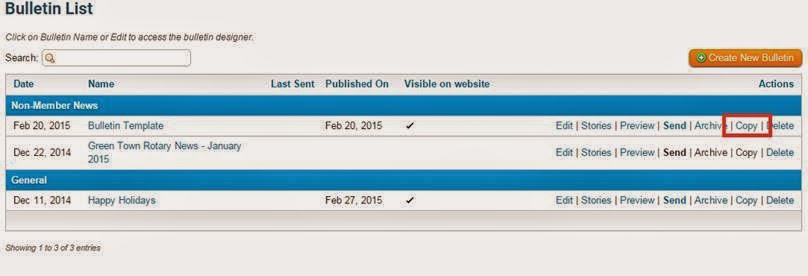
The final step is to simply save the template. Now when it comes time to create your next bulletin, simply click on the "Copy" link next to the template. This will duplicate the template and you will then be prompted to rename this duplicate edition to the name of your bulletin. Once renamed, navigate to the bulletin designer and simply begin editing the content in the widgets that need updating. To add stories to the empty story widget (if it is part of your template) hover over the stories widget and add them from the library.

This is a great alternative for clubs that don't necessarily want to start creating each new edition from scratch but also don't want to copy archived copies of the bulletin, where they then need to deselect items that you don't want appearing.

Have your own helpful tips on creating bulletins? Comment below and let us know! For additional assistance with the bulletin module, visit our knowledgebase.

Friday, February 20, 2015

Tip of the Week!

Every single day, almost 700 million people worldwide actively check their Facebook news feed. The social media site has become one of the fastest ways to spread news and information. This viral spread of ideas is a by-product of the way Facebook works. Readers are more likely to trust content posted by a friend, and more likely to both read it and share it on again. We trust our friends to have vetted the story, to ensure it’s interesting and relevant. This essential trust is the foundation of Facebook’s success.

At ClubRunner, we have introduced tools to help you harness the power of social media. And now, we’ve made it easier for your club to capitalize on Facebook’s uniquely viral ability to spread news. While you could always use the social media bar in your stories to share your club news, these links are now embedded with Facebook tags.

These tags automatically generate a thumbnail image, title and story brief by taking that information right from your story, making your Facebook links all the more compelling. By making your stories more shareable, ClubRunner helps raise awareness of your club events and drive traffic to your site!

Friday, February 6, 2015

Tips for the Week!

Did you know that you can set a cap on the number of stories you want to display on your website?

We've now introduced a new feature to the home page stories widget, where you will now see a field called "Items to Display". This option allows you to set a customizable cap on the number of stories to display on the homepage. The default has been set to 25 but you can always edit this by going to the properties screen. Great for automatically keeping the website clean and stories visible!

Did you know that you can now extract member privacy options within your member data report?


We've added a new field available when downloading your managing your membership list data. When downloading member data, you have the option to include member privacy options. These will be displayed in separate columns in the resulting Excel file download.

Did you know that we've upgraded our security settings to the highest requirements?

We're proud to announce that we have updated all of our SSL certificates to comply with SHA-2's highest security requirements. Google recommends SHA-2 standards as the benchmark for web security and this improvement means your data enjoys a high degree of protection.

Monday, January 12, 2015

Attendance 3.0 - Data Migration Tool Now Available!

A few months ago we announced the release of our brand new and completely revamped Attendance 3.0 module which we made available in Early Access Preview.

As part of our latest software update, we've released an Attendance Data Migration tool that will allow you to import your attendance from the current module to Version 3.0. Early Access Program participants can begin migrating attendance records by simply navigating to the Attendance 3.0 Dashboard, clicking on the check-boxes and selecting the data you want to transfer. 

With the help of our Beta and Early Access team, we've been working hard to improve this new module by incorporating all their feedback and requests so as to cater to the custom attendance needs of each club.

The new and forthcoming Attendance 3.0 module is a far more intuitive and revamped version of what you are currently used to. Besides more advanced tracking functions, this new module will give you the ability to:
  • Bank and Track make-ups for members
  • Auto-assign a makeup from the members' pool for missed meetings
  • Track attendance for honorary members
  • Record guests and otehr visitors
  • Customize attendance rules based on member type (excused vs. exempted)
  • View attendance history and performance in a dashboard view
  • and more!
Interested in becoming part of the Early Access Preview Program and previewing this module firsthand? Email us at rotary@myclubrunner.com with the name of your club so that we may install it for you!