#37: Did you know that you can use the EventPlanner to get members to volunteer for your new committee structure?
Use the Volunteer Tasks sub-module within EventPlanner to create each committee as a Task, and each subcommittee as a subtask. You can also specifiy how many members are needed per committee. When you’re done putting together your structure, you can issue a Volunteer request to all your members so that they can see the club’s committee structure and who else has joined each committee. Then, they can volunteer online and sign up to join a committee.
For more detailed instructions on using the Volunteers sub-module, please click here.

Showing posts with label committee. Show all posts
Showing posts with label committee. Show all posts
Friday, April 23, 2010

Thursday, February 11, 2010
Updated Feature: District Org Chart by Year
The Organization Chart on the District system has been upgraded to the new platform. In addition to being able to sort the positions easily using the up and down arrows, this chart is now completely independent by year, so you can make any changes to the positions and areas ahead of time. Organization charts can be set up in advance for an unlimited number of years, rather than just the current and next year. Committees are now easily accessed from this chart, and are available for every position, including officers.
For more information about product updates, please visit our official website.
For more information about product updates, please visit our official website.
Thursday, January 14, 2010
New Report for Committees Module - Member Committees by Year
A new report has been added to both Club and District committee modules (Basic and Enhanced versions): Report by Member, Committee or Year. This report allows you to generate listings of members by year or committee or both. In addition, view a report of all committees a member belongs to.
To access this report, go to your Administration page, click on Committees Management, then Member Committees under Reports.
For more information about this report, please contact support@clubrunner.ca.
To access this report, go to your Administration page, click on Committees Management, then Member Committees under Reports.
For more information about this report, please contact support@clubrunner.ca.
Friday, August 21, 2009
Week 9: Tip of the Week
#9. Did you know that you can use the Event Manager to create and monitor volunteer lists?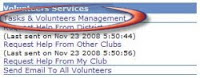 Once you create an event for posting on your club or district’s site, you can set up tasks and request for volunteers! Use this tool to keep track of all action items, solicit help for your event or promote teamwork and collaboration by getting members to sign up for committees. To add tasks, create volunteer lists and monitor its activity, simply follow the steps below:
1. Click on services for the desired event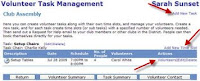
2. Under Volunteer Services, click on “Tasks & Volunteers Management”
 Once you create an event for posting on your club or district’s site, you can set up tasks and request for volunteers! Use this tool to keep track of all action items, solicit help for your event or promote teamwork and collaboration by getting members to sign up for committees. To add tasks, create volunteer lists and monitor its activity, simply follow the steps below:
1. Click on services for the desired event
2. Under Volunteer Services, click on “Tasks & Volunteers Management”
3. Click on “Add New Task”
4. Enter the required information as requested in the popup box
5. Once the new task list listed, click on “Add New Time Slot” and enter the details requested
4. Enter the required information as requested in the popup box
5. Once the new task list listed, click on “Add New Time Slot” and enter the details requested

Friday, August 7, 2009
Committees Module Update

We have received an overwhelming response to the new Committees Module. With the feedback, we have been alerted that there are a few bugs in the system which we are currently correcting.
The Enhanced Committees Module is available to all ClubRunner users on a trial basis until August 31, at which time there will be some features that will be only available as a upgrade for clubs. Districts will keep the full functionality as it presently appears.
The Enhanced Committees Module is available to all ClubRunner users on a trial basis until August 31, at which time there will be some features that will be only available as a upgrade for clubs. Districts will keep the full functionality as it presently appears.
For more information about the difference between the Basic and Enhanced Committees Modules, visit the ClubRunner Official Website. Thank you for your suggestions and feedback!
Thursday, July 23, 2009
New Feature Release: Committees Module
In this new and improved module, manage all club and district committee listings in one place! With this new feature, once logged into your club's site, you are able to view a listing all yearly and standing committees and all associated members, complete with their designations and contact information. The enhanced committees module allows you to upload relevant documents to share and send targeted emails to committee members.
For more information about this new offering, visit ClubRunner's official website.
For more information about this new offering, visit ClubRunner's official website.
Subscribe to:
Posts (Atom)