Welcome to ClubRunner's BlogSpot


Welcome to ClubRunner's BlogSpot - the place to stay on the pulse of hot off the press news updates about product developments, service announcements, local events and so much more!

Also, you can initiate discussions and share information among fellow ClubRunner users.

Your feedback is always welcome and necessary to help us make ClubRunner better. We want to know what you like, what you don't and what's on your wish list. Please let us know how we can enhance our service.
Showing posts with label collaborate. Show all posts

Thursday, October 7, 2010

ClubRunner.ca has a New Look!


There’s a reason to celebrate here at ClubRunner and we’d like to share our joy with you! As of October 7th, 2010, ClubRunner has a new look and feel. We’ve launched a new website that better reflects our products and services. You told us that you wanted a website that was easy to navigate through and we listened! Over the past few months, we’ve worked hard to ensure that we create a dynamic and user friendly site which is simple and intuitive. Our URL has not changed, so you can visit us using www.clubrunner.ca.

Our new website features an intuitive drop down menu, smart buttons for quick navigation to relevant pages, a breadcrumb trail so you never lose track of where you are and much more! The dynamic trial and order forms allow you to type out all the required information rather than writing it out by hand. You told us that you wanted to be able to find information easily and yes, we listened! We’ve also incorporated an internal search engine so finding data will be a simple and uncomplicated task. Of course, these are just a few of the many updates that we’ve worked on. On our new website, anything you need is now just a click away!

Our focus is and always will be to allow clubs to be able to connect, collaborate and communicate. Browse through our new website and provide your feedback!

Friday, August 21, 2009

Week 9: Tip of the Week

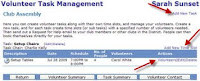
#9. Did you know that you can use the Event Manager to create and monitor volunteer lists? Once you create an event for posting on your club or district’s site, you can set up tasks and request for volunteers! Use this tool to keep track of all action items, solicit help for your event or promote teamwork and collaboration by getting members to sign up for committees. To add tasks, create volunteer lists and monitor its activity, simply follow the steps below:

1. Click on services for the desired event
2. Under Volunteer Services, click on “Tasks & Volunteers Management”
3. Click on “Add New Task”
4. Enter the required information as requested in the popup box
5. Once the new task list listed, click on “Add New Time Slot” and enter the details requested
For more information about managing, viewing and reporting on your events, please visit the online help section on your club or district’s site.