- Attendee Groups (Paid, Unpaid or All Attendees)
- Packages selected
- Add-ons purchased

Showing posts with label distribution list. Show all posts
Showing posts with label distribution list. Show all posts
Thursday, June 3, 2010
New in MyEventRunner: Event Email Service
Now event chairs are able to email their attendees. Specify your target audience based on:

Friday, August 21, 2009
Week 9: Tip of the Week
#9. Did you know that you can use the Event Manager to create and monitor volunteer lists?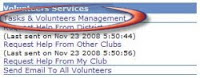 Once you create an event for posting on your club or district’s site, you can set up tasks and request for volunteers! Use this tool to keep track of all action items, solicit help for your event or promote teamwork and collaboration by getting members to sign up for committees. To add tasks, create volunteer lists and monitor its activity, simply follow the steps below:
1. Click on services for the desired event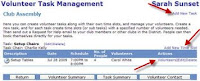
2. Under Volunteer Services, click on “Tasks & Volunteers Management”
 Once you create an event for posting on your club or district’s site, you can set up tasks and request for volunteers! Use this tool to keep track of all action items, solicit help for your event or promote teamwork and collaboration by getting members to sign up for committees. To add tasks, create volunteer lists and monitor its activity, simply follow the steps below:
1. Click on services for the desired event
2. Under Volunteer Services, click on “Tasks & Volunteers Management”
3. Click on “Add New Task”
4. Enter the required information as requested in the popup box
5. Once the new task list listed, click on “Add New Time Slot” and enter the details requested
4. Enter the required information as requested in the popup box
5. Once the new task list listed, click on “Add New Time Slot” and enter the details requested

Friday, June 5, 2009
Week 1: Tip of the Week
Tip #1: Did you know that if your district is online with ClubRunner that you’ll have the potential to communicate with other clubs within your district?
If you are a current President, President-Elect, or Secretary, your Email Message Center will include distribution lists for all other executives in your District. Simply click on the list name to expand it and you will see the name of the club and the member. Note you won’t be able to see their email address, but by checking off their name they will receive your message. Use this feature the next time you need to announce your club event, request volunteers or even just for special announcements.
Each week there'll be a new tip posted to help you become more familiar with what ClubRunner can do. Stay tuned!
If you are a current President, President-Elect, or Secretary, your Email Message Center will include distribution lists for all other executives in your District. Simply click on the list name to expand it and you will see the name of the club and the member. Note you won’t be able to see their email address, but by checking off their name they will receive your message. Use this feature the next time you need to announce your club event, request volunteers or even just for special announcements.
Each week there'll be a new tip posted to help you become more familiar with what ClubRunner can do. Stay tuned!
Subscribe to:
Posts (Atom)