Welcome to ClubRunner's BlogSpot


Welcome to ClubRunner's BlogSpot - the place to stay on the pulse of hot off the press news updates about product developments, service announcements, local events and so much more!

Also, you can initiate discussions and share information among fellow ClubRunner users.

Your feedback is always welcome and necessary to help us make ClubRunner better. We want to know what you like, what you don't and what's on your wish list. Please let us know how we can enhance our service.
Showing posts with label sponsorship. Show all posts

Monday, April 18, 2016

Tip of the week: Sponsorship module

Many of you are already aware that you have access to a Sponsorship module in ClubRunner. Essentially, this module allows you to let businesses advertise on your website, and all revenue collected is the clubs to keep.

Clubs have the ability to display these ads on the homepage, bulletin and on all secondary pages of the website. Did you know that you can control which secondary pages you want these ads to display on?

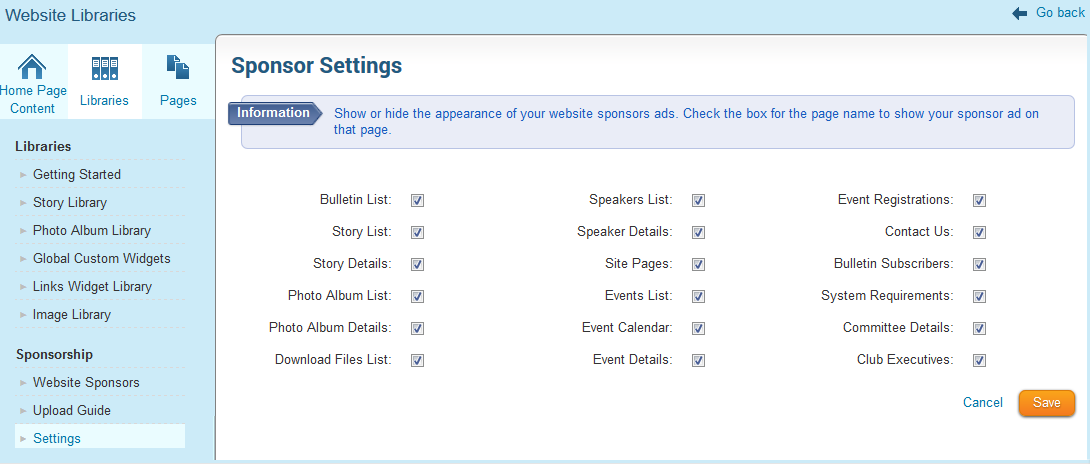
How can I change these settings? To view which pages you can have sponsor ads on:

1) Navigate to the Manage Sponsor Ads page and then to the Sponsor Settings
2) Check which pages you want the ads to show on and click save

How are other clubs using this feature? We found that most clubs charge different rates based on how many pages the advertiser chooses to include the ad on, which in turn helps the club fundraise more for their projects. We asked a few clubs to share examples of their advertising structures and found that the majority charge somewhere between $50 - $100 for the ads on the homepage followed by anywhere between $2 - $25 for all subsequent pages per year.

Others choose to display sponsor ads on all pages to give advertisers maximum exposure for one flat rate, while some choose to limit the ads to the home page only. How does your club use the sponsorship module?

Friday, October 1, 2010

Sponsor Ads on your ClubRunner Site Benefits Everyone

Advertising on ClubRunner most definitely has its benefits. With the launch of ClubRunner 2.0, we’ve increased the ways available to advertise on club sites. Ads can be text or graphic ads, and can appear wherever you choose on your home page and on the right hand side of all your subsequent website pages. You have the freedom to choose to show each ad on the homepage as well as the eBulletin – for maximum flexibility. Not to worry, uploading sponsor ads is as easy as uploading photos to your website. Uploading as little as 4 sponsor ads in a year can equate to your website administration fees, which means, you can get your ClubRunner subscription for free!*

To get started, your Site Administrators needs to login to your website, and click on Website Sponsorship Area. This will allow you to create the ads for your website. You can also prepare an information page which shows visitors how to submit an ad and what your pricing is. This will appear on all pages under the Sponsorship area, linked to the Interested in being a Website Sponsor link. With ClubRunner, the opportunities are endless!

*Suggested cost only. Rates are determined by each individual club and not enforced by ClubRunner

Friday, September 10, 2010

Week 47: Tip of the Week

#47: Did you know that you can reorder the sequence of your website contents faster with drag-and-drop

We’ve made it easier to reorder website content listings by using either up/down arrows or the drag and drop feature. This is available for home page links, stories, news, photo albums, site pages, download files and the website sponsorship area. Try it out today!

Friday, May 14, 2010

Week 40: Tip of the Week

#40: Did you know that you can earn revenue for your club and promote local businesses by having website sponsors?

Having a web presence for your club has many benefits, both for the club itself and its members. As many businesses are moving to online options to promote their products and services, why not provide a platform for promotion and public relations. Adding a sponsorship ad to your site is simple. To start adding sponsors, follow these steps once logged in*:

1. Once you have logged in, click on Website Sponsorship Area under the For Administrators heading.

2. Click on Add New Sponsorship.

3. Type in an email address or URL if you want the sponsorship ad to become a link.

4. Select Text for a text sponsor, or Image for an image.

5. Type in the text for a text sponsor.

6. Click the Browse... button and locate the image for an image sponsor.

7. Type in a Start Date and End Date

8. Decide on where you wish this ad to appear. You can choose to show on any of the following: Home page, Secondary pages and eBulletin.

9. Click on Save

*Please note that only Site Administrators have access to this feature.

Clubs typically charge anywhere from $50 to $250 for annual sponsorships, and this depends on the size of your club as well as the friends distribution list. Don’t forget to upload your own sponsoring guide so that interested parties can find out your club’s policies and get in touch with your club if interested. You can upload this file under the For Administrators section, by clicking on Website Sponsoring Guide.

For more information about ClubRunner visit our official website or contact a member of the ClubRunner team.

Wednesday, July 22, 2009

Week 5: Tip of the Week

Tip #5: You Can Get ClubRunner for Free*

How you may ask? You can have your subscription paid for by online sponsors! On the right hand side of your site, there’s an opportunity for you to have various sponsors links posted. The choice is yours as to how much you charge based quantity, duration of posting and size. To view sample advertisements, visit the official ClubRunner site (link to live site pages).

*Subsidize your annual ClubRunner subscription fee by charging a fee for advertising and sponsorships on your club or district site.