Welcome to ClubRunner's BlogSpot


Welcome to ClubRunner's BlogSpot - the place to stay on the pulse of hot off the press news updates about product developments, service announcements, local events and so much more!

Also, you can initiate discussions and share information among fellow ClubRunner users.

Your feedback is always welcome and necessary to help us make ClubRunner better. We want to know what you like, what you don't and what's on your wish list. Please let us know how we can enhance our service.

Monday, August 17, 2015

Five Ways to Show Appreciation for Your Members

August is membership month for Rotary, a month dedicated to clubs celebrating the people who make Rotary a reality. It's a time to focus our attention on members and thank them for everything they do, and to bolster their motivation for the work. It’s important that Membership Month does not simply turn into lip-service, expressed only via a special banner on your ClubRunner site or bulletin, which is easy to do. There are many ways to thank your members in a concrete way which can every month memorable.

Celebrate their lives

When a club member marks a milestone, such as a birthday or anniversary – why not celebrate that along with them? Mention the day at the meeting closest to the date of the milestone and mark it in a tangible way. This could be as simple as bringing cupcakes to celebrate a birthday. For particularly big events (such the birth of a grandchild or a milestone anniversary) consider maintaining a small budget for gifts or tokens. Similarly, if a member is facing a difficult time in their life (such as the death or illness of a loved one) ensuring that the club is there to provide practical and emotional support goes a long way. This sort of recognition goes a long way in making members feel appreciated and part of a community.    

Build your community

Photo Credit: © Rotary International/Alyce Henson
In addition to honoring the members as individuals, celebrate their dedication to the club and Rotary once in a while. One way to do this is by scheduling regular team-building and socialization events. These events help build a positive dynamic and also give your members a chance to build friendships outside the context of Rotary. By doing so, they will improve their teamwork within the club in the future which will help foster a sense of family and belonging.


Give them a chance to shine


Photo Credit: © Rotary International/Alyce Henson
Your members became Rotarians because they wanted to help their community and make a difference in the world. As such, whenever possible you should give them the chance to get involved in the projects and causes that matter to them. Give them the chance to take leadership and offer them ownership of these initiatives. Your club members are more likely to give their all in the service of a cause they care for. Sometimes, clubs have the same people who run a particular event every year and as a result members think they can't get involved. Simply rotating co-chairs every year gives everyone a chance to participate and get involved. It's simple things like these that show members that their involvement is welcome and needed.

Recognize and reward individual achievements

Photo Credit: © Rotary International/
Alyce Henson
When a club member goes above and beyond to achieve something of worth, it is important to formally recognize this. You could even use Membership Month as a time to offer special recognition to members who have worked particularly hard in the preceding year. A donation in their name to Polio Plus or the Rotary Foundation is a tangible acknowledgement of the work they’ve done.    

Spread the word

While internal recognition is invaluable, don’t forget to spread the word. Let everyone know about the good work of your membership and about the fun they have. Your ClubRunner bulletin and website are excellent tools for this. When a member wins an award from the club or community, take a photo and publish it on your site and bulletin. When your group hosts a particularly member event, put up a photo gallery or a write-up. Invite your members to share these through social media and blogs. Doing so increases the profile of your club in the community and serves to attract new recruits. And, going beyond ClubRunner, community newspapers are often hungry for content. Invite the local media to record memorable events in your club life, such as Paul Harris award ceremonies.

How does your club celebrate its members? Comment below and share!

Friday, August 14, 2015

Tip of the Week!

Did you know that you can now add events defined in ClubRunner as well as your volunteer registrations to your own personal calendar?

This has been a very popular demand and we're happy to say that this feature is now available! We've added iCalendar (ICS) functionality to the Events module as well as the Volunteers module, so that you can easily add the event reminder or volunteer registration to your own personal calendar.

To add the event to your calendar, navigate to the events details page where you will see a calendar icon appear next to the date and time of the event. Clicking on the calendar icon will download the ICS file on your computer. Once downloaded, simply clicking on it will open the event details in your default calendar from where you can then save it.

When you sign up to volunteer for a task, the confirmation email you will receive will also include an ICS file as an attachment. Simply click on it to add it to your calendar. If you were to cancel your registration then the cancellation email you'll receive will contain another ICS file that will remove the reminder from your calendar.

iCalendar is used and supported by a large number of products, including Google Calendar, Apple Calendar and Microsoft Outlook. These are just some of the changes we're making to ClubRunner but there are a lot more on the way.

Continue to share your suggestions and feature requests with us by emailing feedback@clubrunner.ca.

Friday, July 24, 2015

Club Highlight - Rotary District 5550

In our last edition, we highlighted a very active club in Castro Valley, California. Today, we’ll set our sights northward. Rotary District 5550 covers a vast range of territory, encompassing the provinces of Manitoba and Saskatchewan and much of northwestern Ontario.

http://www.rotary5550.org/

District 5550 makes excellent use of their ClubRunner site and is a great example of an active Rotary district. Upon landing on their website, your eyes are drawn directly to their banner which is a striking photo of the new Canadian Museum of Human Rights in Winnipeg, a dramatic and vibrant image. By customizing the size of the banner and adding Rotary branding, the overall effect of the image comes through stronger.


Did you know, you can increase the height of your banner simply by adjusting the pixel count within the Edit Banner page under Banner Height?  For best results, keep in mind, that the background image should not exceed 960px in width.

Notice also how the district has clearly branded their banner with the Rotary wheel showcasing their affiliation to Rotary. Did you know you too can access a wide variety of Rotary-themed logos to use not only in your banner but also throughout your website from the Rotary Images folder in your site's image library, where we've already added official Rotary logos and images.

One of the most important tips to keep in mind for a great website design is that you as the designer have full control of how you want to define a visitors journey on your site. You have to understand who your visitors are, what their motivations are, and then based on that, decide how best to present relevant information, which is easy to access. A great place to start is the navigation menu.

On District 5550's website, you see a well defined navigation menu packed with useful links to information about Rotary International, the District, and the programs undertaken by the clubs within it. It makes effective use of drop-down menus linking to built-in pages and custom content. By categorizing all pages according to subject, they've made it easy for visitors to delve into the history and work of the district. In fact, their menu itself is a great example of what it means to map a user's journey.

As you continue past the menu, the first thing you see is a prominent and simple graphic greeting from the District Governor, with a photo attached. They customized this widget to include an email link to get in touch with the DG directly and a link to the current edition of the newsletter, providing an easy way to read the DG's message without taking up real estate on the main body of the homepage. The use of photos is always a great idea, adding a warm and welcoming touch.

As you view the remainder of their site, they've made excellent use of custom widgets to display a variety of things which showcase how active the district is, which also helps their website stand out. From the creative use of displaying all 48 clubs within the district on Google Maps to featuring Rotary themes of the month and fundraising events and goals, the addition of graphics opposed simply to text elevates the look of the site.

The use of the sponsors front and center on the right is also ideal especially for their visitor demographic. Fun fact, did you know that western readers typically look at a webpage from left to right, and as such are actually less likely to find the ads to be intrusive, yet intriguing enough to click on should the content of the ad capture their attention.

Scrolling down, you can see their page is a treasure trove of information about both the District and news about the clubs.  There are a dozen stories online, and fresh new information seems to be added on a regular basis. This is a good way to keep members informed and draw non-members to their site as a source of information. 

Click on the banner image below to explore their website!
http://www.rotary5550.org/

Thursday, July 23, 2015

Happy New Year - Top Rotarian Questions for ClubRunner

A lot of work has to get done prior to the beginning of Rotary New Year, and a lot needs to get done in the weeks that follow. From preparing goals for the next year to preparing new executives, this naturally is one of the busiest times for all clubs, which is why we thought we'd cross off one item from your list by exploring some of the most common questions we've found clubs have during this time of transition and answering all of them here.

1) How do I email all my members?

Contacting all your members at once is easily done through your ClubRunner site. You can access your ClubRunner email by clicking on the Communication tab on the top of your Admin page and then on the Email Services link. This will bring you to the Club Communication page, where you can compose a new email.

On Step 1 of the Create Email page, you are asked to identify the recipients of the email. Here, you will see a list of all your distribution lists, whether system generated or custom. To learn more about how to create custom distribution lists, click here.

Simply click the check box next to the recipient category to select everyone in that group.  You can see this step highlighted below:


If you only wish to email your active members, click on the plus icon to expand the category. Then, click the checkbox next to Active and leave the Honorary checkbox empty. You can even select specific members to email by clicking on the Expand List link next to each sub-category.


Then, simply type up your email as part of Step 2.  For more information on sending emails, refer to our KnowledgeBase or check out our video walkthrough.

2) How do I ask all our members to update their profiles?

It's important to have accurate member data as you enter the year ahead. The most efficient way to achieve this is to have your members update their own information.  ClubRunner has a specialized feature called Request Member Update that allows you to request each member to check and update their profile information. To access this feature, login to your ClubRunner site and click on the Membership tab. Then, click on the Request Member Update link.


On the page that appears you have the option to send the request to selected members, or to all your members. If you wish to send the request to given members only, click the checkbox next to the name of each member you wish to contact. Then, click the button labeled Send Update Request to Selected Members. Or, if you wish to send the request to everyone, simply click on the button labelled Send Update Request to All Club Members. This automatically sends an email to members with a link that allows them to access and update their profile if needed.

For step-by-step directions guiding you through this process, refer to this help article in our KnowledgeBase.
3) How do I update the President’s Message?
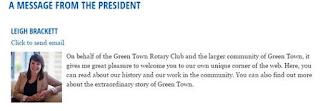
With the New Year comes new direction and new leadership.  One excellent way to express these changes to your members and site visitors is through use of the President’s Message widget. This widget displays a customized message from the President of your organization, along with their name and photo. You can also modify the properties of this widget to include a link to email the President and even display a preferred phone number, both of which are taken from their ClubRunner profile, therefore, if they were to update these items on their profile, this widget would automatically be updated as well.
The use of this widget is a great way to both introduce a new president and talk about your club’s plans for the year ahead. For more information about the customization and use of this widget, check out this article.
4) How do I change the website banner and logo?

With the new year comes a new theme. This year, the presidential theme is Be a Gift to the World. Rotary International president K.R. Ravindran chose this theme as a way of encouraging Rotarians to give the gifts of their time and talents in improve lives in their communities. The theme logo is already available through your site’s Rotary image folder. You can utilize these new graphics in places such as your site banner, club logo or throughout your site.

Click here to learn how to create a new banner or customize your existing one. And, don’t forget to update your club logo with the new graphics! To find out more about this year’s theme, and to access the new theme logo and supporting materials, visit the Rotary Presidential Theme page.

5) How do I send out the Bulletin?

Another excellent way to spread the message of the New Year and the new theme is through the use of your bulletin. Of course, the new year is also concurrent with a handover in positions and roles within the club. The club newsletter is an excellent way to share information and keep all members up to date with the changes.
If you need help putting together a bulletin, we have a number of helpful articles and videos to help you get through the process. And, if you need just a little more help, you can always connect directly to our support team.

6) How do I check if we are properly integrated with Rotary International?

Your club’s annual invoice from Rotary International (RI) is calculated based on your membership numbers.  As such, it’s very important that RI have an accurate count for your club. If you have Rotary Integration turned on at your site, your membership information should be passed along automatically anytime there is a change. However, even if you have integration turned on, changes can take a few days to show up in the RI database. In either case, it’s a good idea to manually check your membership on the RI website.  For more information about RI integration in ClubRunner, refer to our KnowledgeBase.

Have more questions that we didn't cover here? Check out our Knowledgebase for answers to many other questions or contact our support team with your questions, suggestions and feedback! We're happy to help.

The Story Behind July 1

Happy New Year, everyone! Though it may sound strange to hear that in the middle of summer, July 1st marks the New Fiscal Year for Rotary Clubs around the world. To find out why, we’ll need to delve into the history of the organization.

1910 Rotary Clubs of America Convention (Image courtesy of Rotary International)

Did you know that the July 1st New Year has been a Rotary tradition for over a century? When Rotarians had their first convention, way back in 1910, the New Year was set as the day after the convention ended in August. They made the same decision in the lead up to the 1911 and 1912 conventions, which also took place in August. At the 1912 meeting, the Rotary board of directors ordered a financial audit of the International Association of Rotary Clubs. The auditors went on to recommend that the Rotary fiscal year end on June 30, in order to give clubs time to prepare their financial statements in advance of the convention. They’d also be able to determine an accurate number of delegates to send, so convention organizers would be able to prepare.

These were all good reasons, but in an age of wool suits and no air conditioning it didn’t take long for practical considerations to change the date of the conventions again. In 1916 the Rotary decided to hold their future annual conventions in June to avoid the hottest days of the year. However, the July 1 date for the Rotary New Year had already become a tradition, one that continues 102 years later.

Wednesday, June 17, 2015

New Features - Taking Attendance

Club secretaries everywhere are heaving a sigh of relief with the release of ClubRunner’s new Attendance 3.0 module.

Based on the feedback we've received over the years, we've designed this module from the ground up to cater to the unique needs of each club. Besides more advanced tracking functions, Attendance 3.0 gives you the ability to bank and track make-ups, auto-assign a makeup from a member pool, track meeting guests and much more!

You can access the Attendance module directly from the top menu of your club's Admin page, provided you have an access level of 50 or better. From here, you will be able to transfer your data from the current Attendance module using the built-in migration tool.

With all the data available to you from within the attendance module, such as guest attendance rates for example, you can develop an accurate model of your club's demographics, which is an essential step in the creation of strategies for future growth.

Training Resources:

For an overview of the features, click here.

To access the Attendance 3.0 Guide, click here.  

For additional help articles,  click here.

Friday, June 5, 2015

Tip of the Week!

You asked for it, and we delivered! Did you know that you can now upload multiple documents to the Club Documents section on your website and also download all documents to your computer?

Similar to how you can upload multiple photos to your albums, you now have the ability to add multiple documents from your computer to the Club Documents section. Upon clicking on the "Edit Club Documents" link on the Admin Page, you will notice two new buttons on the top right called, "Add Multiple" and "Download All".

Clicking on "Add Multiple" will allow you to select all files and upload them or directly drag and drop them into the file list area. Simply select which folder you would like to upload the documents under and define their access level and finally on 'Start Upload'.

The "Download All" option will extract all your documents and folder structure for you in a ZIP file for easy archiving.

These are just some of your wishlist features that we're working to add. There is still a lot more on the way! Please continue to send us your suggestions at feedback@clubrunner.ca!

Wednesday, June 3, 2015

Microsoft Canada Recognizes Innovation with ClubRunner


We're thrilled to have been recognized by Microsoft Canada as one of two finalists for the 2015 Impact Awards in the category of Partner Hosted Cloud Innovation.

 This award provides recognition to companies that deliver high-quality, innovative yet seamless solutions to their customers.

 "This year's entries were some of the best we've ever seen and our judge's decisions were certainly not easy." said Microsoft Canada Channel Chief Jason Brommet.

Over the past few years, we've been working hard to recreate the ClubRunner platform with Version 3.0. Hosted on the Microsoft Azure platform, Version 3.0 scales to your requirements and needs, and offers a level of customization that is truly unmatched.

The awards ceremony takes place on July 12th, and no matter what the outcome, the selection is an honor in itself. And, we have you to thank for this. Without your direction and support, we'd never had made it this far.

Thank you!

The Wonderful World of Widgets

Among many other additions, we also introduced an entire directory of Widget help articles. Both the website and bulletin designers offer a large number of widget tools offering you a wide spectrum of functions and possibilities.

You can use widgets ti display as RSS feed, club events, birthdays and anniversaries, a President's message, and much more. You can even create your own custom widgets to embed a Facebook page, YouTube videos, custom images and more.

You can also customize existing widget properties and use them as the building blocks to create a truly distinctive and outstanding website.

To help you get the full use of this sheer range of functionality, we not have a library of articles outlining the use of each widget, along with information on editing their properties.

Club Highlight - Rotary Club of Castro Valley, California

We continue to be impressed at the creativity of our clients and their engagement with the community. The Rotary Club of Castro Valley for example keeps their website fresh while adding their own unique flavor to the site with their own custom banner and design elements that they've interspersed throughout the site.

Castro Valley Rotary Club

The custom banner is a particularly striking feature. It celebrates 50 years of the club's heritage, with the original meeting site on the right and the current one on the left. Between these are images marking their influence in the community, such as their role in organizing the Castro Valley Blues Festival. Using real images from their past and present makes it easy for site visitors to relate to the club and visualize their work and impact they make.

On their website, notice how on the left column of their page, they've made good use of a custom widget to present their meeting details and club information while also providing a link to their Twitter account. This both clearly display club meeting information and promote their social media presence.

In their navigation menu, the Castro Valley Rotary Club keeps information for newcomers front and center, making it easy to find out how to join, with the use of video display, drop down menus and site pages. They even provide a glossary that helps new members understand the unique jargon of the club.

Another good design element is the way the club presents general information about their mission and Rotary above the fold. As you scroll down, the information and resources become more specific to the club showcasing how active they are through the club minutes. This is an excellent way to keep and hold the interest of members and non-members visiting the site. The 'fold' in design speak is the the first half section of the website that is visible when you land on a website. Below the fold refers to the area you see as you scroll down.


In another creative display of widget use, they've customized their Downloads widget and Birthdays and Anniversaries widget with a colored background to make it stand out from the page - a great way to add some simple flair to any website! Did you know that you can alter the color and appearance of most widgets simply by editing the widget properties?

Finally, going back to pictures, the club does a great job using real photos of members, rather than stock photography or clip art. The use of such photos, makes their articles and club more relatable and simply ties their content together.

Know of a ClubRunner website you'd really like us to see, or have some tips on what makes a website great? Share it with us by commenting below.

To visit Castro Valley Rotary's website, visit: www.castrovalleyrotary.org