Welcome to ClubRunner's BlogSpot


Welcome to ClubRunner's BlogSpot - the place to stay on the pulse of hot off the press news updates about product developments, service announcements, local events and so much more!

Also, you can initiate discussions and share information among fellow ClubRunner users.

Your feedback is always welcome and necessary to help us make ClubRunner better. We want to know what you like, what you don't and what's on your wish list. Please let us know how we can enhance our service.

Wednesday, February 13, 2013

Events 2.0 - Feature Update!

We get a lot of great feedback and suggestion requests on a daily basis and try our best to implement them into the system. Our latest software update included plenty of updates, from being able to duplicate events to now allowing your registrants to leave comments upon registering for your event!

Did you know that you now have the ability to enable a comments field when setting up your events?

An optional feature, as an event organizer, you can now enable the comments feature on the event registration page when creating your event. Registrants can then add their own comments when clicking on attend or decline to pass their message to the event chair. 

To do so, simply check the option to enable comments in the registration options screen. You can then view the comments in the registration reports which you can also download.

Should you have any questions or feedback, please don't hesitate to contact our support team!

Monday, February 11, 2013

Tip of the Week!

Our latest software release boasts a lot of exciting updates including the addition of a very popular request!

Did you know that it is now possible to duplicate your event in Event Planner 2.0 rather than designing a new event from scratch again?

You will now see a "Copy" feature in the Events List. Clicking on it will allow you to duplicate the event registration. All details and settings except for the registrations are carried over to your new event.

To duplicate an event, simply click on "Copy" in the Event List page. You will then be prompted to title your event. Upon copying your existing event, you will see your new event listed in the Event list, from where you can continue to edit your new registration and make changes as you see fit.

Your new event will appear as a draft. In order to display your event in the same places as the previous event, you will need to change the status of the duplicated event to 'Active'. Next, you will need to enable registration by opening the event and editing your registration options and reviewing your event start and end dates.

Questions?  Please feel free to contact our support team with your questions and feedback!

Friday, February 1, 2013

Calling All Beta Testers! ClubRunner Version 3.0!

Personalize your web presence to reflect your club's unique style with the easiest website designer yet!
  
Our development team has been working hard to create the third generation of ClubRunner - Version 3.0. Based on feedback we've gathered over the years, we've designed a platform that you've been asking us for.
 
The 3rd generation of ClubRunner will feature a revolutionary new designer, far more intutive and modern than what you are currently used to. Your key to connect to the cloud, the ClubRunner Version 3.0 will be hosted on the Microsoft Azure platform, which means that it will be faster, more reliable and even more secure than ever before.
 
What's New in ClubRunner v3?
 
ClubRunner Version 3.0 boasts lots of new features for your club. Starting with increased security to being able to support your website in various languages, you're going to see a lot of updates.

New Website Designer

The new website designer is more secure and includes an array of new features to allow you to easily customize and create your website with new themes, pages, dynamic widgets and more editing capabilities. Customize the look of your widgets, embed flash files, use the built-in search feature to find what you are looking for or even upload your own customized style sheet, to fully customize the look of your site! Furthermore, with its auto-saving and archiving functionalities, you never have to worry about losing your data.


Customizable and Flexible Editors

The new editor within Version 3.0 includes more fonts and functionalities, an auto-save function, the ability to save content as drafts and much more. Use the provided templates to prepare your content without having to worry about formatting.


Drag and Drop Feature

The new drag and drop feature allows you to select and move your widgets, stories and other content anywhere on your site. Revise the sequence of your stories or widgets easily and quickly, anywhere on your site. You even have the ability to drag and drop images from your computer directly to your image library.


More Features include:
  • Flash Support
  • Much More Robust Dynamic Bulletin featuring threads and an Automatic Archiving Feature
  • Custom Domain Names
  • Refined Image Library with the ability to drag files from your desktop into your library
  • Built-in Internal Search Function
  • CSS Control
  • New Templates in the Story Editor
  • and much more!
Become a Beta Tester!
 
If your club is interested in joining our team of beta testers, email us at rotary@myclubrunner.com or leave a comment below with your club name. We'll get in touch with you with more details. Please note, that your club must be a ClubRunner subscriber in order to join our team of beta testers.

Friday, January 4, 2013

Tip of the Week!

Did you know you can track the traffic to your website with Google Analytics?

We've had a lot of customers take advantage of this feature but if you haven't done so, you can now incorporate Google Analytics to your ClubRunner website.

With Google Analytics you will be able to uncover trends and patterns of website traffic and will be able to track your sponsor ads and more. To integrate Google Analytics to your ClubRunner site, we ask that you email our support team with your Google Analytics Key, so we can turn this feature on for your club. You can reach our support team by emailing support@clubrunner.ca.

If you do not currently have a Google Analytics Key, you will need to first create an account by visiting http://www.google.com/analytics, after which you will be given an analytics key unique to your account.

Should you have any questions, please feel free to contact us.

Friday, December 28, 2012

2012 Feature Updates

It's almost the end of the year and here at ClubRunner, we'd like to thank each and every one of our users in helping make our success possible. With your support by our side, we definitely hit many milestones this year and released many new features.

In fact, we've had a busy year with the development of our upcoming Version 3.0, bi-weekly product releases where many of the features implemented were based on your feedback and our constant attempt to improve our product to better meet your needs.

Did you miss some of our service update announcements this year? Not a problem! Read more on all of our updates by visiting our service updates page. Updated regularly, here you will find information on all of the features we've implemented to ClubRunner this year - even the smallest changes.

We have even more in store for 2013 and are very excited to soon share our latest news and updates with you. Follow our updates here on our blog or on our service updates page. Do you have a suggestion or feature request you would like to add to our customer wishlist? Every year we go through our customer wishlist and try to implement as many feature requests as we can.
We'd love to hear your feedback on how we can improve ClubRunner. You can email us your suggestions at feedback@clubrunner.ca 

We look forward to customizing and further developing ClubRunner to meet your needs.

Until next year...!

Monday, December 24, 2012

ClubRunner Holiday Schedule

Season's Greetings from the ClubRunner family to yours! Here's wishing you the best for a joyous holiday season!


Please note that ClubRunner's hours of operation during the holiday season are as follows:

  • Monday, December 24, 2012 - 9:00am - 12:30pm EST
  • Tuesday, December 25, 2012 - Closed
  • Wednesday, December 26, 2012 - Closed
  • Thursday, December 27, 2012 - 9:00am - 5:00pm EST
  • Friday, December 28, 2012 - 9:00am - 5:00pm EST
  • Monday, December 31, 2012 - 9:00am - 12:30pm EST
  • Tuesday, January 1, 2013 - Closed

We will resume our regular office hours on Wednesday, January 2, 2013. For assistance, please continue to use our help resources to access FAQ's, on-demand tutorials and help guides:


Saturday, December 22, 2012

Season's Greetings from the ClubRunner Team!

Season's Greetings!


As the year comes to an end, our thoughts turn graciously to those who made our success possible this year. Thank you for all of your support!

From the ClubRunner family to yours, here's to a joyous and prosperous 2013!

Rotary International
This year, help Rotary International win charity miles to help children and adults in need by voting in the 10 million Charity Miles Giveaway. Vote by December 25, 2012.

Friday, December 14, 2012

Tip of the Week!

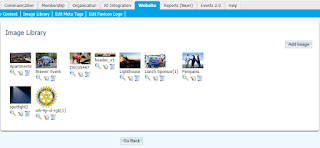
Did you know that you can maintain your own club's image library to use throughout your website?
 
Whenever you click on the 'Add Image' button to insert an image within a story, you will see two libraries on the left hand side, the top one is the ClubRunner library of commonly used logos such as the RI wheel and theme logo. Just below that is your 'Shared Image Libary'. By simply clicking on an image, you will be able to insert it into your story, news or site page without having to keep re-uploading it from your computer. Great uses for this include your club logo, banner, President's photo, etc.
 
To add images to your 'Share Images Library', simply go to the Website tab, then choose Image Library. Click the 'Add Image' button at the top right. Before browsing for your image, you can specify the size which the image will get compressed and resized to. This will be the default size when you insert the image, but you'll still be able to reduce it further after adding it to your story.
 
Note that all members using the Stories, News and Site Pages sections will be able view and insert pictures from the Shared Image Library, however only Site Administrators may add to or edit the library itself.

Friday, December 7, 2012

Tip of the Week!

Did you know that you can now cancel scheduled emails?

Now, if you've scheduled an email to be sent out, it is possible to cancel that email should you not wish to send it anymore. Upon cancelling, your email gets deleted from the system.

Did you know you now have the ability to email statements to all members?

Within the Dues & Billing section, you now have the ability to email statements to all members regardless of the balance owing on their account. Whereas previously, you were only able to email statements to those members that had a balance owing, you can now send it to members that have no balance, for their records.

We'd love to hear your feedback! Send us your feature suggestions at feedback@clubrunner.ca

Friday, November 30, 2012

Coming Soon! ClubRunner v.3.0 - Your Key to Connect to the Cloud!

Personalize your web presence to reflect your club's unique style with the easiest website designer yet!
 
The 3rd generation of ClubRunner will feature a revolutionary new designer, far more intutive and modern than what you are currently used to. Your key to connect to the cloud, the ClubRunner Version 3.0 will be hosted on the Microsoft Azure platform, which means that it will be faster, more reliable and even more secure than ever before.
 
What's New in ClubRunner v3?

ClubRunner Version 3.0 boasts lots of new features for your club, district or association. Starting with increased security to being able to support your website in various languages, ClubRunner Version 3.0 is the solution you have been asking us for.

New Website Designer

The new website designer is more secure and includes an array of new features to allow you to easily customize and create your website with new themes, pages, dynamic widgets and more editing capabilities. Customize the look of your widgets, embed flash files, use the built-in search feature to find what you are looking for or even upload your own customized style sheet, to fully customize the look of your site! Furthermore, with its auto-saving and archiving functionalities, you never have to worry about losing your data.


Customizable and Flexible Editors

The new editor within version 3.0 includes more fonts and functionalities, an auto-save function, the ability to save content as drafts and much more. Use the provided templates to prepare your content without having to worry about formatting.


Drag and Drop Feature

The new drag and drop feature allows you to select and move your widgets, stories and other content anywhere on your site. Revise the sequence of your stories or widgets easily and quickly, anywhere on your site. You even have the ability to drag and drop images from your computer directly to your image library.


More Features include:
  • Flash Support
  • Much More Robust Dynamic Bulletin featuring threads & an Automatic Archiving Feature
  • Custom Domain Names
  • Refined Image Library with the ability to drag files from your desktop into your library
  • Built-in Internal Search Function
  • CSS Control
  • New Templates in the Story Editor
  • and much more!
Become a Beta Tester!
 
We're just about a week or two away from releasing the beta version of ClubRunner version 3.0! If your club is interested in joining our team of beta testers, email us at rotary@myclubrunner.com or leave a comment below with your club name. We'll be in touch with more details soon!