Welcome to ClubRunner's BlogSpot


Welcome to ClubRunner's BlogSpot - the place to stay on the pulse of hot off the press news updates about product developments, service announcements, local events and so much more!

Also, you can initiate discussions and share information among fellow ClubRunner users.

Your feedback is always welcome and necessary to help us make ClubRunner better. We want to know what you like, what you don't and what's on your wish list. Please let us know how we can enhance our service.

Friday, September 14, 2012

Tip of the Week!

Did you know that advanced HTML users now have the ability to override the automatic resize feature?

Our latest feature release now includes a new image class: No Resize.

When users upload images, ClubRunner automatically resizes the images based on where it is being uploaded. Now, users well versed with HTML have the ability to override the stylesheet to prevent the system from automatically resizing the image by adding a style tag within the image. (ex:<  img src=" link "style=" max-width:none;"  >

For more information regarding this new feature, please do not hesitate to contact our support team!
 

Monday, September 10, 2012

Feature Updates!

From adding more currenices within our Dues and Billing module to adding filters in reports, we've been working on releasing some great new features within ClubRunner to make it even easier for clubs and Districts to manage their daily activities. These are just some of the latest features we have released!

Filters Added to Missing Email Address Reports

On the District site, you now have the ability to select member type (i.e.: Active, Honorary, Ex-Member, Staff, etc.) prior to running the report to find members with missing email addresses in their profile making it easier for you to locate the information you need.

Member Terminations Confirmation
Now when you terminate a member, you will see a popup that will tell you the various groups that the member will be removed from such as Custom Distribution Lists, Committees, Executive listing for current year, etc.

Dues & Billing - New Currencies Added

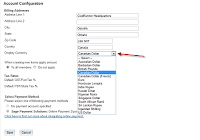
In order to accommodate our International clients, we`ve added new currencies in the system such that invoices can be created with currencies pertinent to the country. Our latest feature release includes the addition of Cayman Island Dollars. A full listing of the curriencies available can be accessed from the `Configuration Settings`page found in the Dues and Billing module.

Sunday, September 2, 2012

ClubRunner's Satisfaction Survey - Results!

Thank you again for participating in our survey a short while ago. We truly learned a lot from your responses and received some great feedback which we will be incrementally working into the ClubRunner service.

What We Learned

In fact, thanks to your feedback, we gained valuable insight both into improvements to make within our product as well as our help and support resources.

What You Loved
  • Our Knowledgebase with help articles & on-demand tutorials that you can access on your own time
  • Regular feature updates which we release every two weeks addressing customer feedback
  • Our friendly and knowledgeable support staff
  • Ability to manage your club events, communications, website, dues and more as a team from one place
What We Can Improve On & How We're Addressing Your Needs
  • Ease of use when it comes to navigating the Admin page as well as overall speed 
This is something we are working to improve. In fact, ClubRunner is undergoing a complete redesign from the ground up with our upcoming Version 3.0. Your key to connect to the cloud, not only will Version 3.0 be more intuitive and flexible, it will also have a faster interface. Additionally, Version 3.0 will be hosted on a more scalable infrastructure and will have drastically improved response times. For more information on Version 3.0, please click here.
  • More intuitive design features
Version 3 Sneak PeekMany of you gave us great insight into the areas that are cumbersome and where you would like to see improvements. As such we have been working hard to ensure that our upcoming Version 3.0 will meet your needs with more design templates to choose from, more customization options including drag and drop widgets and lots of new features to make your communication and administration tasks even easier.
  • Access to more help articles and tips/tricks articles with screenshots from within your club site
Although there was a lot of positive feedback regarding our knowledgebase, we also learned that you would like to see more tips and tricks articles and more how-to videos addressing various items as well as more short-on demand tutorials. Within the next coming months, we will be revamping our knowledgebase and will be including more troubleshooting FAQ's and commonly asked questions as well as more videos and help articles. Additionally, we will also be adding more tips/tricks articles for more advanced users.

Addressing the concerns regarding making it easier to find our help resources, there are now many ways to directly access all of our support resources. To access our knowledgebase, you can:

  • Click on the Help tab from within your Admin page
  • You will notice specific help articles displayed on the right side of your Admin screen depending on the page you are on (i.e.: Dues & Billing, Site Pages)
  • Visit www.clubrunner.ca and then on the Need Support button the left side of the page
  • Visit community.clubrunner.ca and then click on the Knowledgebase button the left side of the page
  • Bookmark www.clubrunnersupport.com to quickly access our main support center and gain all the information you need
Additionally, you can also join the conversation and discuss your best practices with other ClubRunner customers by participating in our Community Forum. You can login to the community forum using the same login credentials you use to access your website.
  • Better follow up with bug reports/system issues
We did receive some great suggestions regarding reporting bugs or system issues. We understand you want to be kept in the loop and as such we are building an internal infrastructure to be able to follow up with customers and give status updates when bugs are reported. We will also be publicizing a page of 'known issues' along with their resolution dates so that you can keep track of the work being done. Additionally, when we have scheduled system updates, you can follow your announcements on our twitter page.

We also received numerous feature requests from you as part of your survey responses and are happy to announce that you will see many of the requests incorporated into the ClubRunner service offering in our upcoming release of ClubRunner Version 3.0.

We hope this gives you a better idea of our direction and thank you once again for all the feedback. We are committed to making ClubRunner easy to use and valuable to all Rotary clubs and we truly appreciate all of your support in helping us become more aware of areas of improvement. Should you have any questions or concerns, please do not hesitate to contact us!

Monday, August 20, 2012

Congratulations Rotary Club of Chaguanas!

Early on last month, we conducted a ClubRunner Satisfaction Survey so we could hear your thoughts about ClubRunner. We were honoured to have received such an overwhelming response from all the survey respondents and would like to sincerely thank everyone that participated for their feedback and suggestions!

While we could not respond to everyone individually, our support, development and management teams read every single comment and we took away some incredible suggestions, which we will slowly begin adding to the ClubRunner service. Apart from various feature requests, there were many things that we learned from all of your responses which we will be sharing with you in a later post, as we continue to analyze all the results!

As our way of thanking all of the respondents for participating in our survey, we entered all the clubs in a draw for a chance to win a free one year ClubRunner subscription. Congratulations to the Rotary Club of Chaguanas - Trinidad!

Please continue to send us your feature requests and suggestions or should you have any questions, please do not hestitate to contact us!


Monday, July 30, 2012

Feature Update! New Reports Added to Club Site!

Our latest release features some new reports for clubs as well as an easier way to access all of your familiar club reports. You will notice a new tab on the top menu bar of your Club Admin page, entitled 'Reports (New)' from where you will be able to access the Club Dashboard, Years of Service report, Birthdays and Anniversaries report, Age Distribution report, eDirectory Reports as well as the eDirectory Builder not to mention the all new Download Member Data report.

Build your own reports with the eDirectory Builder 2.0! This module allows you to create reports and design everything from the layout, sections, data sources and fields. Genereate yearly or standing reports from the eDirectory Reports tab to always be up-to-date about your club information.

View an overview of your member data including gender, age and years of service statistics right from the Club Dashboard. You even have the ability to print the graphs to share with your club executives.

The Years of Service report allows you to select the member type (i.e.: Active, Honorary, Other Users, etc) and then filter by years of service (i.e.: Under 1, 20-30, 50+, etc.). The report will dispaly the names of the members, the date joined and you will also have the option to export the report to excel.

The Age Distribution report displays the number of members you have within each age group, the total percentage and even breaks down that information to reflect both active and honorary members. Similary, the Gender Distribution report also displays the total number of members as well as a percentage breakdown, which you can then export to Excel.

The Birthday and Anniversary report allows you to select a month or the entire year and then filter by 'member birthday, spouse birthday, anniversaries, or join date'. You then have the option to sort the report either by name or by date. Once generated, you can then export the report as a PDF, Rich Text Format, Excel or Tiff file.

The new Download Member Data report allows you select the various fields you would like to extract such as birthday, email, nickname, access level, etc. and then further filter by member type, date joined, last login, etc.

These of course are only some of the changes we're making to make your experience with ClubRunner even better with many new features to come! Thank you for all your feedback regarding the reports functionality. Please continue to send in your feedback to us or should you have any questions, please do not hesitate to contact our support team.

Saturday, July 21, 2012

Tip of the Week!

Did you know you that the download member data export on the club site now allows you to export more fields into an excel report? 

Accessible through the top menu bar under the Membership tab, you will now notice an upgraded version of the download member data feature available to you. Whereas originally you were only able to export information related to membership type and termination reasons, with this new report, you can export many more fields into an excel report.

Simply select the fields you wish to extract such as membership type, nickname, first and last name, first and last name of spouse, address, birthday, website URL, membership number, etc. You can then further customize the filters you would like to apply to your report by selecting the fields you require such as 'Active & Honorary' members and Date Joined, Terminated, Last Login, Date Modified, etc. Once all the information has been selected, click on generate and then export the data!

As we gear towards implementing even more features within ClubRunner, we would love to hear your thoughts! Please continue to send us your feedback regarding this new feature as well as your suggestions on what you would like to see in ClubRunner. As always, please do not hesitate to contact our support team for any questions you may have.

Saturday, July 14, 2012

Tip of the Week!

Did you know you can now view an overview of your membership statistics from the Club Dashboard feature on the club site?

Club Dashboard
Recently added to your club site, you will now notice a new link on your Admin page in the Membership Manager section - the Club Dashboard!

View an age distribution report, gender distribution report as well as your growing membership stats over the years in graphical form and print them as needed. Keep track of your member listing including the number of active members added per month, number of members terminated, number of unique logins as well, view a listing of your member data which includes information such as date joined, last login, etc.

Available to Club Executives, this feature can be accessed by anyone with a club access level of 50 or better. For more information regarding this new addition or for any feedback, please to not hesitate to contact our support team!

Did you know you can now email ex-members from the e-mail message center?

Have an e-mail you would like to send to ex-members? Now you can! You will notice you can now e-mail all inactive members or select specific individuals to send emails to. A great way to keep in touch with past members, this new addition is just one of many we are making based on your feedback!

Friday, June 29, 2012

Introducing Version 2.2 for Districts!

Last year upon releasing Version 2.1 for Districts, we introduced many new features for Districts including Event Planner 2.0, the District eDirectory, District Dashboard, Email Merge fields, the District Bulletin 2.0 and more!

Over the last year, our development team has been working hard to implement your feature requests into the District site. We’re proud to release Version 2.2 for Districts! This major release update includes the addition of many new modules and features along with a fresh new look, easier functionality and some great improvements to existing features.

Starting with the Launchpad!

We redesigned ClubRunner for Districts to give your District Admin page a fresh new look and have made it easier for everyone. The District Launchpad is your new landing page upon logging into your District site.

Not only will you be able to access all the features already available to you but you will notice some really cool features which are found not only on the Launchpad but across the board! On the Launchpad, you will see 5 new widgets summarizing all the important information you require to effectively support your clubs and members.
  • Need to make a quick announcement or remind your members of an upcoming event? The all new Launchpad Message widget will allow you to type in your messages for all to see. Easily update your announcements and keep them up for as long as you like.
  • Wondering how many clubs in your District have not yet activated the RI Integration feature or need a summary of the RI Integration updates that have occurred this past month? Access that information directly from the RI Integration widgets.
  • Easily keep track of your Website Activity. View the number of stories and news items added to the site. Additionally, view the number of events created by the district as well as by all the clubs within the district. Click on the numbers to access more information!
You will also notice the Launchpad is divided into 9 sections from where you can access various features and functionalities. Please click here to read more about the Launchpad!

As you begin to look through your District site, you will notice many new features not to mention improvements on some existing features.

New Access Level and More Fields in the Download Member Data Export!

This release features a new access level on the District level which gives you the ability to grant specific members with access rights to be able to download member data. Previously only available to Site Admins, you can now give access to specific members from the Member Access Rights page on the District site. 

Best of all, the download member export now allows you to export more fields into an excel report, such as Website URL, Membership Number, Birthday, Classification and much more. Furthermore, you can even customize the filters you would like to apply to your report by selecting the fields you require such as 'Active & Honorary'  members and Date Joined, Terminated, Last Login, Date Modified, etc.

Google Maps for Clubs

This brand new feature will allow you to view a map of all the clubs in the District on Google Maps with filters allowing you to display the clubs based on the time of the day they meet as well as the day of the week they meet. This new feature can be added from the District Information widget onto your homepage. Once added, simply republish your website.

Redesigned Photo Organization Chart & Member Designations

The all new redesigned photo organization chart now also displays your member designations with special icons along with the name of your club and your title in the form of a business card. Identifying member designations just got easier!

District Dashboard Updates

Within the District dashboard, you now also have the ability to filter by area such that you can generate membership statistics by area as well as by club for a more refined search. A vast improvement to the AG module, with this new update, Assistant/Area Governors can now access a dashboard view of all the clubs in their area. Additionally, AG's also can now generate more reports to monitor their clubs membership.

Customizable Email Templates & Attendance Reminder Email 

ClubRunner District Version 2.2 gives you the ability to create numerous custom email templates. Moreover, you now also can customize your attendance reminder emails and edit the content as you wish!

Missing Email Address Reports

In addition to the existing reports tracking your email statuses, a new reporting module within the Emails tab allows you to view all the members with missing email addresses. You have the option to view their phone numbers in order to call and follow up and request a member data update.

These are of course only some of the changes implemented. We are working diligently to provide you with valuable features to assist you in supporting your clubs. We would love to hear your feedback regarding the new look and all the various features that have been added to the system. Please write to us at feedback@clubrunner.ca with your thoughts and suggestions.

Should you have any questions regarding this update, please do not hesitate to contact our support team!

Saturday, June 23, 2012

Feature Tips of the Week!

Did you know you there are two new story widgets available in the Dynamic Bulletin Editor?


You now have the choice between inserting either your 'story brief' or 'all details' (brief and content) into your dynamic bulletin. These two new options can be found in the widget selector menu in the Bulletin designer.  Selecting the story brief widget will display an image and just the brief with a link directing readers to the complete article. Selecting the 'all details' widget will insert an image along with the entire article into the dynamic bulletin.

Did you know you can now grant permission to specific members within the District site to be able to download member data?


Previously only available to Site Administrators, we've released a new access level on the District level which gives you the ability to grant specific members with access rights to be able to download member data. In order to do so, click on the "Membership" tab from the top menu bar and then on "Member Access Rights". From here, you can assign this new access level to specific members. Please note, this feature is only available on the District site.


Friday, June 15, 2012

Feature Updates - Website Designer, Committees Module & Dues & Billing!

Deleting Widgets Confirmation!
Confirm before Deleting Widget
We always appreciate your feedback on the system and always strive to incorporate your suggestions into the ClubRunner platform.

As part of our latest feature update release, we've added a layer of protection in order to ensure widgets are not deleted from the Website Designer screen by mistake. As many of you requested, you will now be asked to confirm whether you wish to delete a widget from the designer screen upon clicking on the delete button. Upon clicking 'yes', your widget will be deleted. If you had clicked the delete button in error, the confirmation message will give you the ability to cancel the request.

Did you know you can now select and e-mail members of subcommittees from the e-mail tab in the Committees module?

Subcommittee Listing
You now have the ability to select members of subcommittees as recipients of your emails. From the Committees module, upon clicking on the e-mail tab, the system will allow you to expand your subcommittee member listing in order to see the members and select and email them.

New Currencies Added in the Dues & Billing Module!
In order to accommodate our International clients, we've added new currencies in the system such that invoices can be created with currencies pertinent to the country. This release includes the addition of Kuwaiti Dinar and Uganda Shillings. A full listing of the currencies available can be accessed from the 'Configuration Settings' page found in the Dues and Billing module.

Please continue to send in your feedback and suggestions to us! Should you have any questions or concerns, please do not hesitate to contact our support team.