Welcome to ClubRunner's BlogSpot


Welcome to ClubRunner's BlogSpot - the place to stay on the pulse of hot off the press news updates about product developments, service announcements, local events and so much more!

Also, you can initiate discussions and share information among fellow ClubRunner users.

Your feedback is always welcome and necessary to help us make ClubRunner better. We want to know what you like, what you don't and what's on your wish list. Please let us know how we can enhance our service.

Saturday, April 28, 2012

Join ClubRunner in Bangkok at the 2012 Rotary International Convention!

ClubRunner will be at the 2012 RI Convention in Bangkok, Thailand this May, between May 5-9 and we look forward to meeting you there! We have some very exciting plans for this 5 day event and we'd like to invite all those attending, to visit us at our booth, #1104, to join in on the fun!

There is a lot of activity planned during this action packed event! Take part in some exciting prize draws, interact with our ClubRunner Champions, participate in our live demos and meet the team! We'll be unveiling some exciting features and will also be conducting live training sessions where we'll cover various aspects of ClubRunner in depth.

On Tuesday, May 8 at 4:30pm, come celebrate the official unveiling of our newest, most revolutionary, soon to be released platform - ClubRunner Version 3.0 - your key to connect to the cloud! ClubRunner Version 3.0 is a far more dynamic, personalized and intuitive platform which has been designed with your requests and desires in mind! It includes some exciting features, such as:
  • drag and drop widgets
  • flash support
  • dynamic image library
  • built-in search bar
  • ...and much more!
Stay tuned for more information about ClubRunner Version 3.0 and our official release date announcement!

We look forward to seeing you in Thailand!

Friday, March 30, 2012

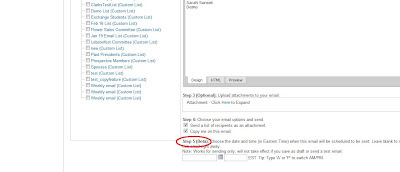
New Scheduler in the Email Message Center!

Did you know you can now schedule your e-mails to be sent at a future date?

We've now added a scheduler in the e-mail message center which will let you schedule when you want to send your e-mails. Although, currently in beta version, once you've composed your message, simply select the date you want the system to send your e-mail on by clicking on the calendar icon and then type in the time (in Eastern time).

If you leave the scheduler option blank, your e-mail will be sent right away, as they always have! This new option works for sending only and will not take effect if you save your e-mail as a draft or for test e-mails.

More information, please do not hesitate to contact our support team!


Friday, March 16, 2012

Feature Update - Club Documents

Did you know that you can now collapse sub-folders as well as transfer documents between folders?

As part of our latest release, you now have the ability to collapse your subfolders. To do so, simply click on the folder icon next to the sub folder name. Clicking on it again, will expand the folder and display the list of all documents stored within that folder.
Another exciting update to the club documents feature is the ability to transfer your documents between folders. To do so, simply click on the edit icon in the actions menu. Upon doing so, a pop up screen will appear on your screen allowing you to transfer the document to another folder as well as edit the name and description.
Should you have any questions or feedback, please do not hesitate to contact our support team!

Friday, March 9, 2012

New Copy Event Feature - MyEventRunner

A popular request for MyEventRunner, a new option now allows event chairs to duplicate an event rather than designing the event registration from scratch again.

All the information regarding the event is copied except the event date and registrants. You then have the ability to edit the event details from the edit screen and make the changes as you see fit. To duplicate the event, simply click on 'duplicate' in the Event List page. You will then be prompted to title your event. Upon copying your existing event, you will see your new event listed in the Event list, from where you can continue to build your new event registration form.

Our mission is to simplify your club and district administration tasks and we thank you for all the feedback that you send to us to help us improve the ClubRunner platform. Please continue sending in your suggestions and feedback to feedback@clubrunner.ca.

Friday, March 2, 2012

ClubRunner Becomes Official Rotary International Licensee!

ClubRunner, the leading provider of online Rotary club administration and communications software, is pleased to announce that it is now an Official Rotary International Licensee.

Better Rotary Branding

ClubRunner and Rotary International have been working closely to improve productivity RI logoand communications for Rotary clubs and Districts globally over the past 2 years and this association further cements the partnership between the two entities. Benefits of being an official licensee include more flexibility in incorporating Rotary branding into the software, to further promote the organization and its clubs' public relations.

Better Collaboration

Moreover, this relationship also means that Rotary International and ClubRunner will work closer together on projects to not only improve the quality of service provided but to enhance the sharing of information between clubs. We're excited to announce that ClubRunner is one of the first Rotary based software providers in the world to have been classified as a licensed vendor of Rotary International.

Better Exposure

Becoming an official licensee also entitles ClubRunner to attend more Rotary based events such as the International District Assembly, resulting in more opportunities for us to meet our customers and provide direct support, customer service and training. ClubRunner currently attends 20 regional training seminars across North America as well as the annual Rotary International Convention.

To view ClubRunner's official press release, please click here.

We are proud to able to build on this relationship such that we can continue to give ClubRunner customers yet another boost to improve club productivity levels and achieve their goals.

Friday, February 24, 2012

Feature Updates - Nicknames and MyEventRunner!

Nicknames as the preferred field!

Earlier this month, we announced how the popular request to have nicknames populate as the preferred field throughout the system had been released. We're happy to announce that now, nicknames can also be used as the preferred field in the e-mail message center as well as in the events module! If within your ClubRunner profile, the nickname field is populated, the entire system will refer to you by your nickname.

Did you know that your event registration can display how many packages are still available for purchase and whether the event is sold out?

Now, if for your event, you are selling a limited amount of packages/add-ons, your registrants will be able to see the number of packages left to be purchased as well as if the event is sold out.

For more information on MyEventRunner, please click here.

Friday, February 17, 2012

Visit ClubRunner's Booth at a PETS Near You!

It's officially PETS season and members of the ClubRunner team will be in attendance at various PETS throughout the next few months. If you or a member of your club is planning to attend, be sure to drop by our booth or attend a session so you can learn about all our recent product enhancements and new features! Get a live demonstration of the features soon to be released and share your experiences with ClubRunner.

Next weekend, members of our team will be at SoCalNev and High Country PETS! If you're planning to attend, be sure to drop by our booth!

For a complete listing of all the PETS we are scheduled to attend, please click here.

Friday, February 10, 2012

Nickname Now the Preferred Field!

A popular request, we've now made it possible to have your nickname as the preferred field to be used throughout the system instead of your first name.

Now, if in your profile, the nickname field is populated, the system will use your nickname to refer to you rather than your first name. For example, instead of displaying your full name (i.e.: Sarah Gardener) in a list of committee members or reports, you would be listed as Sue Gardener.

Still using your first name as set by default is the e-mail message center and the events module, which we are still working on to use the nickname field as the preferred choice.

Have suggestions? We'd love to hear your feedback! You can also join the conversation on our ClubRunner Community discussion board.


Friday, February 3, 2012

RI Integration - Updates Archive by Club now Available to Club Executives on District Site

Did you know that an archive of all RI Integration updates that were attempted in the past 3 months can now be accessed by Club Executives on the District site?


The list will only display members with updates and will indicate whether or not the update was successful, and if not, the reasons why. Club Executives can access the Updates Archive by clicking on the 'RI Updates Archive' link on the Admin page.


We're very happy to be the first vendor to have fully integrated our database with Rotary International. This means, that not only does your member data sync to RI's database, you can now also sync officer information and meeting time and location. For more information on the RI Integration, please visit our RI Integration Help Center.

Friday, January 27, 2012

Exciting Feature Updates - Banner Ads & E-mail Message Center!

Did you know that you can now adjust the alignment of the banner ads on your ClubRunner website banner?


We're excited to have added a new feature within the Banner designer to give you more options in regards to the vertical alignment of the banner ads. You can now select whether you want the ad to be displayed at the top, middle or bottom right hand side of the banner, giving you more even more flexibility when designing your banner. The alignment of the ad can be modified from the new drop down menu in the Banner Designer page within the Website Designer module.


Did you know that you can now copy an existing custom distribution list within the E-mail Message Center, in order to create a list?


That's right! This new feature enables you to create new distribution lists by allowing you to copy all contacts from an existing distribution list. Upon copying a distribution list, you will be prompted to name your new Distribution list and will be given the option to add more members to the new distribution list you are creating. To copy a distribution list, access your existing lists through the E-mail Message Center module and simply click on "Copy List".


For any assistance, please do not hesitate to contact our support team!