 Released today, you will now see a ‘Facebook Like’ widget in Website Designer 2.0. Once added to your site, a Like button will appear, which visitors can simply click on to add your website link and club info to their Facebook wall. A prompt will appear to sign into the visitor’s Facebook account, after which they will be able to add a comment that will accompany the post. The widget will then update automatically to reflect this action by displaying the number of ‘likes’ your website has received, which is an excellent way to promote your site and increase traffic using the Facebook network. It’s that easy!

Friday, April 8, 2011
New: Facebook Like Button!
Released today, you will now see a ‘Facebook Like’ widget in Website Designer 2.0. Once added to your site, a Like button will appear, which visitors can simply click on to add your website link and club info to their Facebook wall. A prompt will appear to sign into the visitor’s Facebook account, after which they will be able to add a comment that will accompany the post. The widget will then update automatically to reflect this action by displaying the number of ‘likes’ your website has received, which is an excellent way to promote your site and increase traffic using the Facebook network. It’s that easy!

Friday, March 25, 2011
Tip of the Week!
#59) Did you know you can now add captions to the photos in your Photo Albums ? Recently released, this new feature will allow you to add a caption to all your pictures in your Photo Albums as well as add a description under each picture. You will now see an 'Edit Caption'  icon in the Photo Albums page. Simply click on this icon and add a caption as well as a description of the picture and click on save. When an individual views the picture, they will be able to read the caption under the picture.
 icon in the Photo Albums page. Simply click on this icon and add a caption as well as a description of the picture and click on save. When an individual views the picture, they will be able to read the caption under the picture.

Friday, March 11, 2011
Tip of the Week!
#57) Did you know that you can now directly add images to your 'Stories'?
Just released, this new feature allows you to add images to your Stories from either selecting images stored in your image library or by browsing for the file on your computer.
To add an image, simply click on ‘add image’ and select the image you want to display within your Story. You can select images from your image library or can choose to upload an image from your computer.
Just released, this new feature allows you to
 add images to your Stories from either selecting images stored in your image library or by browsing for the file on your computer.
To add an image, simply click on ‘add image’ and select the image you want to display within your Story. You can select images from your image library or can choose to upload an image from your computer.
Friday, February 25, 2011
Tip of the Week!
#56) Did you know that there is an easy and automatic way to get your login name and password if you are a new ClubRunner user or have forgotten your login credentials?
To retreive your password: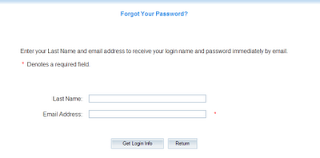
1) Click on the "Login" tab
2) On the Members Login page, click on the link "Forgot your password?"
3) On the Get Password page, type in your last name and email address.
4) Click on "Get Login Info"
5) Check your email for your default username password.
Our system will perform a security check by matching the last name submitted with the email address provided. If the email address we have on file (either inputted by your club director or imported from the District) is different from the one you provide, this method will not work. In this case, you will have to get your username and password from ClubRunner Support.
To retreive your password:

1) Click on the "Login" tab
2) On the Members Login page, click on the link "Forgot your password?"
3) On the Get Password page, type in your last name and email address.
4) Click on "Get Login Info"
5) Check your email for your default username password.
Our system will perform a security check by matching the last name submitted with the email address provided. If the email address we have on file (either inputted by your club director or imported from the District) is different from the one you provide, this method will not work. In this case, you will have to get your username and password from ClubRunner Support.
Saturday, February 19, 2011
Visit ClubRunner's Booth at a PETS Near You!

 It's now PETS season and members of the ClubRunner team will be in attendance. If you or a member of your club is planning to attend, be sure to drop by our booth or attend a session so you can learn about all our recent product enhancements and new features! Get a live demonstration of the features soon to be released and share your experiences with ClubRunner.
This weekend, ClubRunner is at the Pacific Northwest PETS! If you're planning to attend, be sure to drop by our booth
Click here for a complete listing of all the PETS we are scheduled to attend.
Friday, February 11, 2011
Tip of the Week!
Tip #55: Did you know you can create a custom widget in order t o add a Google map highlighting your club meeting location on your ClubRunner website?
In order to do so, simply search for your location on Google maps and then copy the HTML link from Google and add it in your custom content box. You can then display your meeting venue location on your home page! This feature is only available with Website Designer 2.0. For assistance, please visit our knowledgebase or contact our support department.
 o add a Google map highlighting your club meeting location on your ClubRunner website?
 In order to do so, simply search for your location on Google maps and then copy the HTML link from Google and add it in your custom content box. You can then display your meeting venue location on your home page! This feature is only available with Website Designer 2.0. For assistance, please visit our knowledgebase or contact our support department.
Friday, January 28, 2011
Tip of the Week!
Tip #54: Did you know you can now control your website's meta tag keywords?
A new feature available for both Clubs and Districts, you will now be able to better control your website’s meta tag keywords and description to improve your search results in Google and other engines. The good news is that if you don’t modify your meta tags, we’ll do it for you! When you access this feature for the first time, you will see all fields personalized with your own keywords such as city, state, and club name to make sure you’re found instantly, so be sure to visit this page and set your keywords soon. A few hours after you set your keywords, search engines will begin to pick them up and as a result your site will begin to rank higher in search engines.
A new feature available for both Clubs and Districts, you will now be able to better control your website’s meta tag keywords and description to improve your search results in Google and other engines. The good news is that if you don’t modify your meta tags, we’ll do it for you! When you access this feature for the first time, you will
 see all fields personalized with your own keywords such as city, state, and club name to make sure you’re found instantly, so be sure to visit this page and set your keywords soon. A few hours after you set your keywords, search engines will begin to pick them up and as a result your site will begin to rank higher in search engines.
Friday, January 21, 2011
Tip of the Week!
Tip #53: Did you know that you can opt of receiving district bulletins and emails?
In our ongoing efforts to improve privacy levels for our customers, we’ve added a new feature which allows you to opt out of receiving district bulletins and emails. If you no longer wish to receive these messages, you now have the ability to opt out. In order to do so, simply go to your member profile and click on the privacy tab. Uncheck the checkboxes next to ‘District Emails & District Bulletin’ and click on save. It’s that simple.
In our ongoing efforts to improve privacy levels for our customers,

 we’ve added a new feature which allows you to opt out of receiving district bulletins and emails. If you no longer wish to receive these messages, you now have the ability to opt out. In order to do so, simply go to your member profile and click on the privacy tab. Uncheck the checkboxes next to ‘District Emails & District Bulletin’ and click on save. It’s that simple.
 Friday, January 14, 2011
Tip of the Week!
Tip #52: Did you know you can add customized widgets to your ClubRunner Website?
In addition to selecting from the already available widgets, you can also add customized widgets to your website. In order to do so, simply go to the Website Designer section from the admin page and click on ‘Add Content’. Within the editor, you will be ab le to add a variety of content to your home page such as images, videos, meeting announcements, etc. You can also create and edit the widgets using HTML coding if you choose to do so. This feature is only available with ClubRunner Version 2.0. For further assistance on editing widgets, visit our support center or contact our support team at support@clubrunner.ca.
In addition to selecting from the already available widgets, you can also add customized widgets to your website. In order to do so, simply go to the Website Designer section from the admin page and click on ‘Add Content’. Within the editor, you will be ab
 le to add a variety of content to your home page such as images, videos, meeting announcements, etc. You can also create and edit the widgets using HTML coding if you choose to do so. This feature is only available with ClubRunner Version 2.0. For further assistance on editing widgets, visit our support center or contact our support team at support@clubrunner.ca.
Friday, January 7, 2011
New Year, New Resolution
With the start of a new year, many people make their lists of resolutions and aspirations. This is by no means is an exception for clubs!
This year, why not boost your club’s image by revamping your website to better reflect your club’s unique personality. Website Designer 2.0 can help you customize your site by changing the theme, colour schemes and even drop in large graphics on the front page. Attract more members and generate more interest and visits by regularly posting news and photos to your e-bulletin and photo gallery. Maybe this is the year that your club can actively look for site sponsors to easily generate ad revenue for your club!
ClubRunner is preparing for some exciting updates expected to be released soon, so that we can help you take your communication and public relations needs to the next level. Stay tuned for more information! Is there something that you would like to see in your ClubRunner service? E-mail us at feedback@clubrunner.ca and we will be sure to add it to our wish list of features for 2011!
Subscribe to:
Posts (Atom)