#48: Did you know reports generated in ClubRunner can be exported for personal use or distribution?
Reports that are available in ClubRunner can now be exported in either PDF or Excel format. Also recently available, under the Birthday and Anniversary Report, you can create a report for spouse’s birthdays as well as member birthday’s, join dates and anniversaries. If you have any suggestions for additional reports or search parameters, contact feedback@clubrunner.ca or visit the user community and join into the discussions.

Friday, September 17, 2010

Friday, September 10, 2010
Week 47: Tip of the Week
 #47: Did you know that you can reorder the sequence of your website contents faster with drag-and-drop
We’ve made it easier to reorder website content listings by using either up/down arrows or the drag and drop feature. This is available for home page links, stories, news, photo albums, site pages, download files and the website sponsorship area. Try it out today!
Friday, September 3, 2010
Week 46: Tip of the Week
#46: Did you know that you can have more information in your stories and news items
The capacity of characters within your stories and news articles has increased to the following:
If you haven't already switched your site to ClubRunner Version 2.0, watch the video to see how easy it is today!
The capacity of characters within your stories and news articles has increased to the following:
- Brief (appear on the home page as an introduction to your subject) = 20,000 characters
- Content (appear within your bulletin and/or stories/news pages of your site) = 30,000 characters
If you haven't already switched your site to ClubRunner Version 2.0, watch the video to see how easy it is today!
Friday, August 20, 2010
Week 45: Tip of the Week
 #45: Did you know that Club and District documents are now organized by folders.
ClubRunner 2.0 has re-organized club and district documents to support multiple folders so it is easier to organize and find specific information. With this update, you are able to change the list order of files within the folders from most to least important, relevant, etc. using our new and improved up/down icons. You can also created multiple folders and subfolders to further categorize your documents by year, topic, or committee. If you’re looking for the link for a particular document to reference elsewhere on your site, click on the magnifying glass to copy the URL.
For more information, contact our support team.
New - ClubRunner 2.0 has a built-in shared image library!

Gone are the days that you need to upload your desired standard Rotary images from your local computer to your website. A new feature of ClubRunner V2.0, you are now able to upload commonly used pictures for your club within the image library. Now you can quickly and easily reference various images in your custom content and banner designer from this predefined image library. Located under the Website tab, this enhancement allows site administrators to upload pictures so they can now be stored and accessed in a centralized location. For each picture uploaded, you can specify the re-size width or height so that it can be compressed. If your image is greater than 1024 pixels, it will automatically be re-sized for you.
For more information about this feature, please contact our support team.
Friday, August 13, 2010
Week 44: Tip of the Week
#44: Did you know that adding YouTube Videos to your site has become easier!
Now it’s easier to upload YouTube videos to your site. In the HTML editor, simply click on the “Embed YouTube Video” button. This will provide a popup box that you can paste the embed link into and it will be placed on your site without any other HTML knowledge requirements.
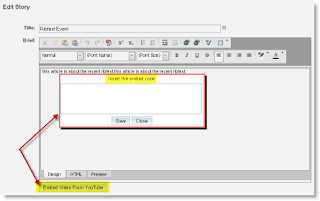
Please note that this feature is only available with ClubRunner V2.0. To take advantage of this quick and easy way to upload embed YouTube Videos, switch your site today.
Now it’s easier to upload YouTube videos to your site. In the HTML editor, simply click on the “Embed YouTube Video” button. This will provide a popup box that you can paste the embed link into and it will be placed on your site without any other HTML knowledge requirements.

Please note that this feature is only available with ClubRunner V2.0. To take advantage of this quick and easy way to upload embed YouTube Videos, switch your site today.
Wednesday, August 4, 2010
ClubRunner 2.0 is Here...Take a Look
If you're a ClubRunner user, switch your site and rediscover ClubRunner 2.0 today. If you're just learning about ClubRunner, activate your free 30-day trial.
Friday, July 30, 2010
Week 42: Tip of the Week
#42: Did you know that ClubRunner 2.0 is completely menu driven
Navigation of the through your site’s administration section is now even more user friendly. An intuitive ribbon menu navigation makes it easier to access all the modules you need within 2 clicks. However, you can still find your familiar Admin page under the first tab if you choose to view everything at once.

Navigation of the through your site’s administration section is now even more user friendly. An intuitive ribbon menu navigation makes it easier to access all the modules you need within 2 clicks. However, you can still find your familiar Admin page under the first tab if you choose to view everything at once.

To learn how to create a customized navigation menu for your site, attend a live webinar or watch our on-demand demo.
Friday, July 23, 2010
Week 41: Tip of the Week
#41: You can define and list member designations
If you have an access level of level 50 or greater, you can create and assign various designations to your active members. With three levels of designations available – Universal (which are predefined by ClubRunner), District Defined (if District is online with ClubRunner) and Club Defined, now it’s easier to identify all members within a club or district that fall under an exclusive, yet special category, such as Past President or Paul Harris Fellow. Once member designations are assigned, they will show up in the “Rotary” tab of each member’s profile, and can also hold a comments area per assignment. Also, you will be able to run reports (and export in CSV format) and communicate exclusively to these members if need be through the email message center.
For more information about how to use this powerful feature, contact our support team.
Thursday, July 22, 2010
ClubRunner Launch Party at RI Convention 2010 was a Blast!
On June 22, hundreds of Rotarians participated in ClubRunner’s launch party to celebrate the entrance of a new era! With the Launch of Website Designer 2.0, many current and prospective users viewed the demonstration of how they could make their club and district sites truly distinct and unique and display all the wonderful activities going on in their community!
 Many entered the raffle draw to win an iPod® Touch, but it was awarded to one lucky ClubRunner user – Suzanne Johnson from the Rotary Club of Middle Island. Immediate Past District Governor John Gill of District 6040 helped us to pick the winners and fellowship with all Rotarians who were there! Other items won include free one year subscriptions to ClubRunner and will be announced within a few weeks to all who visited the ClubRunner booth.
 During this party we also celebrated our Champions, who were and continue to be instrumental in our success. As a special thank you, there was an exclusive raffle draw for them as well and the winner for her own personalized iPod® Touch was Ginny Sharples of the Rotary Club of Scottsdale North!
Topping off the festivities, everyone shared ideas and experiences while enjoying cake, truly making this event a memorable experience for all!
Stay tuned to see our complete photo documentary of this powerful week in ClubRunner and RI history - vive le Montreal!
Subscribe to:
Posts (Atom)