Welcome to ClubRunner's BlogSpot


Welcome to ClubRunner's BlogSpot - the place to stay on the pulse of hot off the press news updates about product developments, service announcements, local events and so much more!

Also, you can initiate discussions and share information among fellow ClubRunner users.

Your feedback is always welcome and necessary to help us make ClubRunner better. We want to know what you like, what you don't and what's on your wish list. Please let us know how we can enhance our service.

Friday, March 27, 2015

Maintaining Your Rank on Google with Version 3.0

As of April 21, 2015, Google will be changing their search algorithm so that mobile-friendly sites rank higher in search results. If your club or district is currently on Version 2.0, this change will have a significant impact on how your website ranks online. Further, with a Version 2.0 website, you run the risk of not being included in search results made through mobile devices. 

To read more about this upcoming change, please click here.

Version 2.0 is built on what is now an older architecture which we are going to stop supporting in the coming month, which is why we strongly advise all clubs and districts that have not yet switched to Version 3.0 to do so. Completely redesigned from the ground up, Version 3.0 boasts many new features and enhancements including a mobile-friendly experience, new Rotary branded website and bulletin themes, customization options, flash support and more.  

We can help!

If you are unsure of which version your club is currently on, please contact our support team. If you prefer that we switch your club to Version 3.0, we'll be happy to do so at no charge. There is no difference in price between the two versions, and switching does not affect your ongoing current events, activities, or admin duties. 

To learn more about how to switch, we invite you to view our help guide which gives you easy to follow step by step instructions, though, once again, if you prefer our team do this for you, simply contact us with the name of your club and we'll be happy to do so.

Don't risk invisibility! 

Friday, March 20, 2015

Best Practices for Bulletin Content

We've said it before! Your club bulletin is an excellent tool for engagement with both your own membership and the world at large. How can you ensure that your newsletter doesn't get caught by spam filters and that all recipients see the same formatting? We often get asked for tips and tricks and some best practices to keep in mind for bulletins, which is why we thought we'd share our first of many articles on the topic and start with what we're asked quite often.

Videos and Animations: Why cannot we add videos in our newsletter?

This is a question we get asked a lot. While many desktop and web-based email clients used to support video in email, as security tightened and spam became a bigger problem, video support became a thing of the past. The following items cannot be sent in the body of an email:
  • Videos
  • Flash
  • Quicktime
  • Windows Media
  • Java Applet
  • HTML5
However, here are some options you can use instead of video:
  • Use animated gifs
  • Take a screenshot of the video and then make a clickable link to where the video file is stored
Forms in Bulletin: We want to collect feedback and want to add a form. Why can't we?

Most email clients consider email forms to be a security risk. While some email clients simply warn you of potential  danger, others outright disable the forms. Below items are not permitted when sending an email:
  • Cannot use Forms (ex: < form >, < select >, < input >, etc.)
As a result, we recommend using a link to the form so the viewer can just click on the link and be taken directly to the form to submit.

Choosing a Bulletin Font: What font and font size is recommended?

When you are sending an email message, it's important to use a font that is clear and easy to read. Be sure to make your font large enough so that the reader doesn't have to squint to read your message, but not so large that the reader has to scroll a long way down to read all the message.

It's also important to use a plain font, because like we mentioned earlier, not all email programs view messages the same way. You don't want the content of your message to be jumbled or strangely formatted because the reader's email program didn't view the font the same way yours did.

Basic fonts like Arial, Verdana, and Times New Roman work well. Depending on how much content you have in your email message select a 10 or 12 point font size for legibility.

Have tips of your own you'd like to share? Comment below! We'd love to hear them.

Monday, March 9, 2015

Updates to the Attendance 3.0 (Beta) Module!

Many of you are already aware of our upcoming Attendance 3.0 module, and in fact many of you have already seen this module come to life by participating in our Early Access Preview! While in it's Early Access phase, we've made a number of changes and updates based on your feedback.

Here are just a few updates recently made, with many more on the way.

Did you know you can now report makeups to closed meetings & against events?

As of our latest software update, you can now add multiple banked makeups using attendance at events. To do so, you would need to navigate to the Makeups screen and enter the date and description for a makeup event, and then select any members who wish to report this event for their banked makeups.

Secondly, you now also have the ability to add makeups to closed meetings. To do so, navigate to the Meetings page within the module and then simply click on the closed meeting followed by the Makeups tab from where you will be able to and single or multiple makeups.

Did you know you can now filter makeups by date?

That's right! We've now added a filter by date range option within the makeups screen, and can select a start and end date to view all the makeups applied during that period for all members.  

Did you know you can customize member lists to print?

We've added a new feature that allows you to filter your member list according to Active/Honorary members as well as other users. Print your list and keep track of all the funds distribution, notes and more!

A far more intuitive and revamped version of what you are currently used to, we will be releasing this module very soon! Stay tuned for its official release date.

Friday, February 27, 2015

Tip of the Week: Create a bulletin template

Did you know templates can streamline your bulletin creation?

Your club bulletin is an excellent tool for engagement with both your own membership and the world at large. A well-written and regularly scheduled bulletin becomes something your subscribers look forward to receiving. Yet, the work of constructing a new bulletin every few weeks can be daunting, especially for your volunteer editors and contributors. To help streamline this process and ensure your bulletin has a standardized look and feel, considering creating a permanent bulletin template to use and re-use as needed.

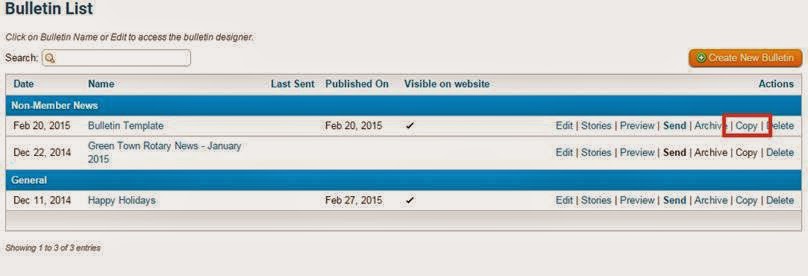
Simply create your template as you would an ordinary bulletin, and give it a clear name such as "Bulletin Template". Next, uncheck the box labelled "Visible on Website". Click on the "Next" button to navigate to the bulletin designer page.

Once on the designer page, place the widgets you would want displayed on the bulletin (i.e: Stories, Events, Custom Content Widgets). Note, as a reminder, dynamic widgets such as Birthdays and Anniversaries, Events will always display data whereas the stories widget will remain empty until stories are selected to display. Do not select any stories as this is just a template we're setting for future use.

The final step is to simply save the template. Now when it comes time to create your next bulletin, simply click on the "Copy" link next to the template. This will duplicate the template and you will then be prompted to rename this duplicate edition to the name of your bulletin. Once renamed, navigate to the bulletin designer and simply begin editing the content in the widgets that need updating. To add stories to the empty story widget (if it is part of your template) hover over the stories widget and add them from the library.

This is a great alternative for clubs that don't necessarily want to start creating each new edition from scratch but also don't want to copy archived copies of the bulletin, where they then need to deselect items that you don't want appearing.

Have your own helpful tips on creating bulletins? Comment below and let us know! For additional assistance with the bulletin module, visit our knowledgebase.

Friday, February 20, 2015

Tip of the Week!

Every single day, almost 700 million people worldwide actively check their Facebook news feed. The social media site has become one of the fastest ways to spread news and information. This viral spread of ideas is a by-product of the way Facebook works. Readers are more likely to trust content posted by a friend, and more likely to both read it and share it on again. We trust our friends to have vetted the story, to ensure it’s interesting and relevant. This essential trust is the foundation of Facebook’s success.

At ClubRunner, we have introduced tools to help you harness the power of social media. And now, we’ve made it easier for your club to capitalize on Facebook’s uniquely viral ability to spread news. While you could always use the social media bar in your stories to share your club news, these links are now embedded with Facebook tags.

These tags automatically generate a thumbnail image, title and story brief by taking that information right from your story, making your Facebook links all the more compelling. By making your stories more shareable, ClubRunner helps raise awareness of your club events and drive traffic to your site!

Friday, February 6, 2015

Tips for the Week!

Did you know that you can set a cap on the number of stories you want to display on your website?

We've now introduced a new feature to the home page stories widget, where you will now see a field called "Items to Display". This option allows you to set a customizable cap on the number of stories to display on the homepage. The default has been set to 25 but you can always edit this by going to the properties screen. Great for automatically keeping the website clean and stories visible!

Did you know that you can now extract member privacy options within your member data report?


We've added a new field available when downloading your managing your membership list data. When downloading member data, you have the option to include member privacy options. These will be displayed in separate columns in the resulting Excel file download.

Did you know that we've upgraded our security settings to the highest requirements?

We're proud to announce that we have updated all of our SSL certificates to comply with SHA-2's highest security requirements. Google recommends SHA-2 standards as the benchmark for web security and this improvement means your data enjoys a high degree of protection.

Monday, January 12, 2015

Attendance 3.0 - Data Migration Tool Now Available!

A few months ago we announced the release of our brand new and completely revamped Attendance 3.0 module which we made available in Early Access Preview.

As part of our latest software update, we've released an Attendance Data Migration tool that will allow you to import your attendance from the current module to Version 3.0. Early Access Program participants can begin migrating attendance records by simply navigating to the Attendance 3.0 Dashboard, clicking on the check-boxes and selecting the data you want to transfer. 

With the help of our Beta and Early Access team, we've been working hard to improve this new module by incorporating all their feedback and requests so as to cater to the custom attendance needs of each club.

The new and forthcoming Attendance 3.0 module is a far more intuitive and revamped version of what you are currently used to. Besides more advanced tracking functions, this new module will give you the ability to:
  • Bank and Track make-ups for members
  • Auto-assign a makeup from the members' pool for missed meetings
  • Track attendance for honorary members
  • Record guests and otehr visitors
  • Customize attendance rules based on member type (excused vs. exempted)
  • View attendance history and performance in a dashboard view
  • and more!
Interested in becoming part of the Early Access Preview Program and previewing this module firsthand? Email us at rotary@myclubrunner.com with the name of your club so that we may install it for you! 

Friday, January 2, 2015

2014 - A Year in Review

All through 2014, change and growth have been the watchwords at ClubRunner. With the support of clubs and districts on six continents, we were busy refining and improving our software and services to meet your feature requests and needs. Thanks to you, ClubRunner is gearing up for another year to be able to take you to the next level of success.

Connecting with Clubs


One of the greatest pleasures we experience is when we get the opportunity to connect in person with the people we are here to serve. In 2014, we had the privilege of travelling to Rotary Clubs in two different hemispheres! Starting with the International Assembly in January, we continued our journey by attending 12 President-Elect Training Seminars between February and March. In June, we went down under for the 105th Rotary International Convention in Sydney, Australia where we met with hundreds of club members and executives from around the world. At home in Canada, we attended 2 Zone Institutes, one in Toronto, Ontario and the other in Victoria, British Columbia and even had the opportunity to welcome several visiting Rotarians to our own office for training and best practice sessions!

We're looking forward to a similar slate of activities in 2015 and cannot wait to meet you once again!

Working with Rotary


As a sign of Rotary International's support for ClubRunner, we were proud to announce the release of a Rotary-themed and approved website and bulletin template. ClubRunner is the first vendor to offer templates and themes with official Rotary approval. In fact, the new template was created in close co-ordination with Rotary International, who ensured it met their new branding standards and digital guidelines. Furthermore, it allows clubs to easily share the look and navigability of Rotary.org.

Emails Enhanced


You asked for it, and we delivered! In order to meet the demands for improved email statistic reports and traffic, we made the switch to a new email service provider. Our new delivery provider handles the email requirements of 180,000 sites including high profile websites such as Pinterest and Foursquare. This new partnership means we can now offer the highest level of digital reliability and security for our clubs. For more information on this upgrade, please click here.

ClubRunner on the Go


When ClubRunner started in 2003, most people were using cell phones with LCD screens and the mobile web was still in its infancy. Fast forward 10 years, in 2013 the International Telecommunication Union (ITU) reported that more than 2.3 billion people around the world were accessing the Internet via a mobile connection, as opposed to 711 million with a wired connection. The ITU predicts that by the end of 2015, the number of people accessing the net through a mobile device will top three billion.

We recognized this fundamental shift in the way people access the web and we worked to accommodate that into our service, which is why we made ClubRunner 3.0 fully compatible with mobile browsers, allowing you to manage your club's web presence from your cell phone or tablet. If you can connect to the Internet, you can connect to ClubRunner!

Keeping the Books


Earlier in 2014, we integrated ClubRunner with Quickbooks, the most popular small business accounting software in the world. Clubs can now export their financial records to Quickbooks, allowing treasurers to save time when it comes to consolidating records and data entry.


Knowledgebase Refined


As part of our quest to bring you the best support, ClubRunner recently began the process of restructing and rewriting our knowledgebase. The knowledgebase is a library of online documentation that has grown in response to the needs of our customers. In the past five years, it has grown enormously as we uploaded new documentation, help resources, FAQ's and recorded training videos and webinars.

The new knowledgebase structure has a more intuitive navigation and much less "depth". You can find answers to your questions with fewer clicks and in less time. And, we are conducting a full review of all content available, editing or re-writing every article for more clarity and better accuracy. Visit www.ClubRunnerSupport.com to view our new knowledgebase, access on-demand help videos and more.


Here's to what was a great 2014! This New Year, we have even more resolve and commitment to continue improving ClubRunner for you.

THANK YOU!

Wednesday, December 24, 2014

ClubRunner Holiday Schedule

Season's Greetings from the ClubRunner family to yours! Here's wishing you the best for a joyous holiday season!


Please note that ClubRunner's hours of operation during the holiday season are as follows:

  • Wednesday, December 24, 2014 - 9:00am - 12:30pm EST
  • Thursday, December 25, 2014 - Closed
  • Friday, December 26, 2014 - Closed
  • Monday, December 29, 2014 - 9:00am - 5:00pm EST
  • Tuesday, December 30, 2014 - 9:00am - 5:00pm EST
  • Wednesday, December 31, 2014 - 9:00am - 12:30pm EST
  • Thursday, January 1, 2015 - Closed
We will resume regular office hours on Friday, January 2, 2013. For assistance, please continue to use our help resources to access FAQ's, on-demand tutorials and help guides:

Friday, December 12, 2014

Tips of the Week

Did you know you can now 'soft delete' Site Pages to recover them later?

We've added a new tab to the Site Page Library, where you are able to access and edit deleted site pages. Previously, deleted site pages were removed and lost entirely. 

This new “soft delete” function allows you to restore old pages as needed. Clubs can also use this as an archival tool, holding on to older pages without cluttering up their active libraries. Deleted pages are removed from the website, while remaining accessible to site administrators under the "Deleted" tab as needed. Furthermore, you can go into the Deleted tab to 'restore' the Site Pages and add them back to your website. 

Did you know that event chairs can now add registrations even if the form created in MyEventRunner has been disabled?

That's right! Site Administrators and Event Chairs can add registrants for an event, even if the signup form has been disabled. This permits you to add late registrants or special guests after the signup window for the members has expired. To add a registrant, simply navigate to the event form on MyEventRunner and use the "Add Registration" link to add these attendees.