Welcome to ClubRunner's BlogSpot


Welcome to ClubRunner's BlogSpot - the place to stay on the pulse of hot off the press news updates about product developments, service announcements, local events and so much more!

Also, you can initiate discussions and share information among fellow ClubRunner users.

Your feedback is always welcome and necessary to help us make ClubRunner better. We want to know what you like, what you don't and what's on your wish list. Please let us know how we can enhance our service.

Friday, January 2, 2015

2014 - A Year in Review

All through 2014, change and growth have been the watchwords at ClubRunner. With the support of clubs and districts on six continents, we were busy refining and improving our software and services to meet your feature requests and needs. Thanks to you, ClubRunner is gearing up for another year to be able to take you to the next level of success.

Connecting with Clubs


One of the greatest pleasures we experience is when we get the opportunity to connect in person with the people we are here to serve. In 2014, we had the privilege of travelling to Rotary Clubs in two different hemispheres! Starting with the International Assembly in January, we continued our journey by attending 12 President-Elect Training Seminars between February and March. In June, we went down under for the 105th Rotary International Convention in Sydney, Australia where we met with hundreds of club members and executives from around the world. At home in Canada, we attended 2 Zone Institutes, one in Toronto, Ontario and the other in Victoria, British Columbia and even had the opportunity to welcome several visiting Rotarians to our own office for training and best practice sessions!

We're looking forward to a similar slate of activities in 2015 and cannot wait to meet you once again!

Working with Rotary


As a sign of Rotary International's support for ClubRunner, we were proud to announce the release of a Rotary-themed and approved website and bulletin template. ClubRunner is the first vendor to offer templates and themes with official Rotary approval. In fact, the new template was created in close co-ordination with Rotary International, who ensured it met their new branding standards and digital guidelines. Furthermore, it allows clubs to easily share the look and navigability of Rotary.org.

Emails Enhanced


You asked for it, and we delivered! In order to meet the demands for improved email statistic reports and traffic, we made the switch to a new email service provider. Our new delivery provider handles the email requirements of 180,000 sites including high profile websites such as Pinterest and Foursquare. This new partnership means we can now offer the highest level of digital reliability and security for our clubs. For more information on this upgrade, please click here.

ClubRunner on the Go


When ClubRunner started in 2003, most people were using cell phones with LCD screens and the mobile web was still in its infancy. Fast forward 10 years, in 2013 the International Telecommunication Union (ITU) reported that more than 2.3 billion people around the world were accessing the Internet via a mobile connection, as opposed to 711 million with a wired connection. The ITU predicts that by the end of 2015, the number of people accessing the net through a mobile device will top three billion.

We recognized this fundamental shift in the way people access the web and we worked to accommodate that into our service, which is why we made ClubRunner 3.0 fully compatible with mobile browsers, allowing you to manage your club's web presence from your cell phone or tablet. If you can connect to the Internet, you can connect to ClubRunner!

Keeping the Books


Earlier in 2014, we integrated ClubRunner with Quickbooks, the most popular small business accounting software in the world. Clubs can now export their financial records to Quickbooks, allowing treasurers to save time when it comes to consolidating records and data entry.


Knowledgebase Refined


As part of our quest to bring you the best support, ClubRunner recently began the process of restructing and rewriting our knowledgebase. The knowledgebase is a library of online documentation that has grown in response to the needs of our customers. In the past five years, it has grown enormously as we uploaded new documentation, help resources, FAQ's and recorded training videos and webinars.

The new knowledgebase structure has a more intuitive navigation and much less "depth". You can find answers to your questions with fewer clicks and in less time. And, we are conducting a full review of all content available, editing or re-writing every article for more clarity and better accuracy. Visit www.ClubRunnerSupport.com to view our new knowledgebase, access on-demand help videos and more.


Here's to what was a great 2014! This New Year, we have even more resolve and commitment to continue improving ClubRunner for you.

THANK YOU!

Wednesday, December 24, 2014

ClubRunner Holiday Schedule

Season's Greetings from the ClubRunner family to yours! Here's wishing you the best for a joyous holiday season!


Please note that ClubRunner's hours of operation during the holiday season are as follows:

  • Wednesday, December 24, 2014 - 9:00am - 12:30pm EST
  • Thursday, December 25, 2014 - Closed
  • Friday, December 26, 2014 - Closed
  • Monday, December 29, 2014 - 9:00am - 5:00pm EST
  • Tuesday, December 30, 2014 - 9:00am - 5:00pm EST
  • Wednesday, December 31, 2014 - 9:00am - 12:30pm EST
  • Thursday, January 1, 2015 - Closed
We will resume regular office hours on Friday, January 2, 2013. For assistance, please continue to use our help resources to access FAQ's, on-demand tutorials and help guides:

Friday, December 12, 2014

Tips of the Week

Did you know you can now 'soft delete' Site Pages to recover them later?

We've added a new tab to the Site Page Library, where you are able to access and edit deleted site pages. Previously, deleted site pages were removed and lost entirely. 

This new “soft delete” function allows you to restore old pages as needed. Clubs can also use this as an archival tool, holding on to older pages without cluttering up their active libraries. Deleted pages are removed from the website, while remaining accessible to site administrators under the "Deleted" tab as needed. Furthermore, you can go into the Deleted tab to 'restore' the Site Pages and add them back to your website. 

Did you know that event chairs can now add registrations even if the form created in MyEventRunner has been disabled?

That's right! Site Administrators and Event Chairs can add registrants for an event, even if the signup form has been disabled. This permits you to add late registrants or special guests after the signup window for the members has expired. To add a registrant, simply navigate to the event form on MyEventRunner and use the "Add Registration" link to add these attendees.

Monday, December 1, 2014

Tips for the Week!

Since we released the Volunteers module last month, we received lots of great feedback and feature requests to make this feature even more powerful! From smaller changes such as updating the format of the task invitation emails to make them more mobile friendly to larger requests such as the ability to add a Volunteer chair, we've made a lot of updates to this feature.

Did you know that you can add the Volunteer Task Group Name to your emails with use of a mail-merge tag?

You asked for it, and we delivered! We've added a new mail merge field for volunteer tasks, which automatically populates your emails with the group name, so that you can manage your communications more effectively! There no longer is a need to duplicate the same message for each group!

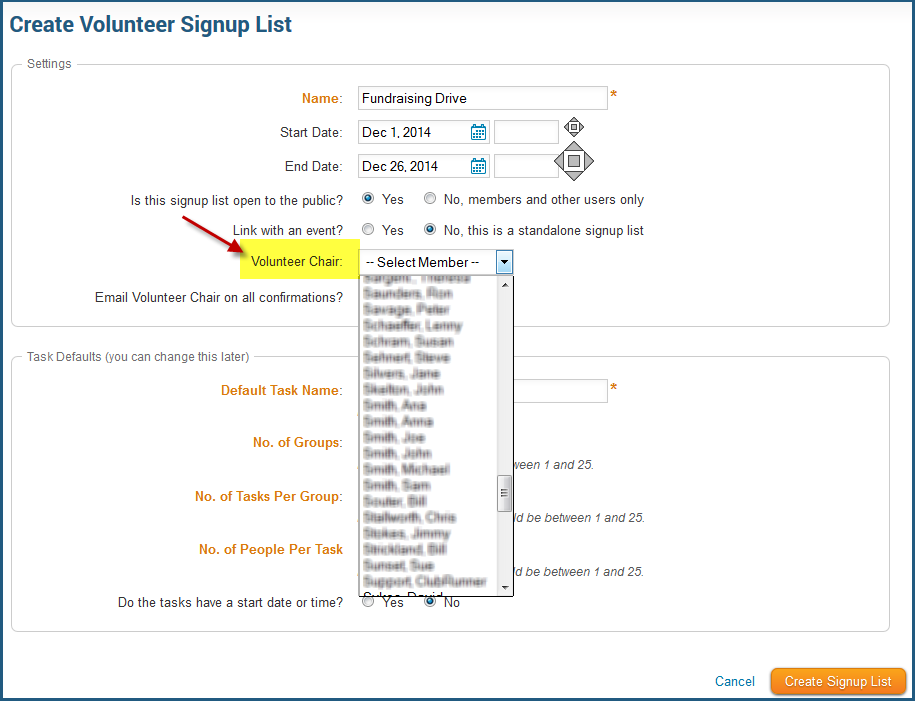
Did you know you have the ability to set a Volunteer Chair?

Previously, only event chairs, site administrators and executives could edit the volunteer tasks associated with the events. We've now added a new role titled Volunteer Chair, which can be assigned to members with any standard access level. The Volunteer Chair will be able to edit the details of any given volunteer task group and can also optionally be copied on all confirmation and cancellation emails.

Visit our Service Updates page to read more about the updates we made to this module as well as others!

Monday, November 24, 2014

Email Statistics: FAQs

We`ve received a lot of great questions regarding the latest announcement about email statistics and limits and wanted to take this opportunity to share our answers with everyone. From understanding email credits to more information on how to access your email traffic reports, we have it all here:

1. Do you count all the recipients of one email in the email limits?

Yes, all recipients of emails are counted in the email statistics limit. This means that if you send one email to 50 recipients, you have used 50 credits from your annual limit. Note that the monthly limit you see is for suggestion purposes and monthly credits that are unused carry over to the next month until the end of your yearly subscription term.

2. Are bulletins included in this limit?

Yes, all emails sent from the system are included within this limit, whether they be email invitations, bulletins or regular emails sent from the message center.

 3. Where can I view my email traffic report and my email statistics?

To find out how to view the email traffic report, click here.
To find out how to view email statistics, click here.

4. What happens if we go over our annual limit?

Prior to setting these limits, we thoroughly analyzed the send patterns of our entire customer base and applied a generous buffer on top of the number of emails sent so that 95% of customers will never go above their annual limit. If we find you are going to go over that limit, we will send you a courtesy email to notify you and will work with you on applying best practices for email sending.

5. Why the change in your email delivery service? Can we opt out of this upgrade?

This is not upgrade for our customers but an upgrade to our email service. Prior to implementing this service, we relied on several different distributors whereby the reliability of email delivery was decreasing due to customers sending emails to invalid email addresses, spam traps and more. As a result, this upgrade was necessary to ensure a higher level of stability, reliability and security. This was applied to the system as a whole and not to individual club or district accounts and as such cannot be opted out of on an individual account basis.

 6. I logged in and followed the instructions to view my Email Traffic Report but do not see this. Why?

It’s possible you’re still on Version 2 of the ClubRunner platform. Email statistic and traffic reports are only available on Version 3.0. We encourage you to switch to Version 3 at your earliest convenience. Please refer to this help article to learn more.

Alternatively, you might not have the correct access levels to view these reports, as these reports are only accessible by members with an access level of 40 or better.

7. When does this take effect?

The new limit was activated on November 24, 2014. However, clubs and districts will be given 90 days from the time of our notice to become compliant. We will regularly be in touch with those clubs and districts that are going above and beyond their annual limit.

8. How does this affect my privacy? Are you sharing my email address with third parties?

Please be assured that we continue to abide by our privacy policy where we state that we will never sell or share your information including email addresses. This change only affects the transmittal of an email after it is already processed and dispatched by our servers, which is the same process we had before. We are serious about protecting your personal information and will continue to ensure it is not divulged or distributed to third parties.

Have more questions? Send them in and we'll be happy to answer them!

Saturday, November 15, 2014

Introducing Email Statistics!

You asked for it, and we delivered! We're excited to introduce email statistics reports, which will allow you to better track email and bulletin deliverability, view which emails have been read and by whom, trace emails and bulletins that have bounced or been blocked and view which emails/bulletins have been marked as spam.

To view email statistics for your club, navigate to the Email Message Center from the Admin page and then click on the Email Traffic Report link on the top menu bar. You'll immediately be able to view your email usage to date with a breakdown showing you how many emails you have this sent this year, within the past 30 days and what your club's monthly average is like. To learn more about email usage, please click here.

Click on the details link under the Actions column to view the types of emails (ie: Bulletin, Event Registration emails, Volunteer Registration emails, etc) that have been sent, the subject line, who the sender is, the date it was sent on, and even select a date range to customize your email traffic report. Click on the emails sent number to dive deeper and view how many emails were successfully delivered, how many were opened and by whom, which have bounced, and more!

There is a whole lot more we're working on to make your ClubRunner experience even better, stay tuned! Have more suggestions you would like to add to our feature wishlist? Email us at feedback@clubrunner.ca.


Wednesday, October 29, 2014

Tip of the Week: Adding Slideshows to your website

We've been getting lots of emails from clubs sharing how they've made their club sites even more dynamic using Version 3.0! There's nothing that makes us happier than seeing how our customers have customized their websites and added different elements to make it unique, without ever needing to know any technical language.

While some like to add custom graphics and stories about the club, others like to add videos and photo albums to share the latest happenings at the club. Did you know that you can embed PowerPoint presentations on your homepage as well?

Similar to how you add videos to your website, you can embed Slideshows using the Custom Content Widget. Follow the instructions on this help article to add a PowerPoint presentation to your website.

Be sure to comment below with the link to your site to share how you've customized your ClubRunner site too!

Saturday, October 18, 2014

Best Practices for Club Websites

Website Themes 

Did you know that you only have 5 seconds to capture the attention of your website visitor, before they leave? What's worse is that once they leave your website, the chances of re-engaging are very low. There's a lot you can do to make sure your website comes out on top. We get a lot of emails from clubs asking for tips on how to improve their websites and overall website experience, which is why we thought we'd share some best practices:

1.

Be Visual

Capture the attention of your visitors with imagery, photos of your club activities, your members, projects, etc. After all, actions speak louder than words and showcasing your club from a visual standpoint not only promotes your club more effectively but also helps visitors get a better sense of what you’re all about, without having to skim through text! The built-in photo albums in ClubRunner are a great way to showcase your activities, and with our web editor, you can easily drop in images alongside your text anywhere.

2.

Content is King - Update it often!

Content is King & Currency is Queen! The real factor that drives a website towards becoming popular and successful is freshly updated content throughout the site. If visitors are presented with outdated information, they have no reason to stay on your site to learn more, let alone return. Potential members may feel that your club is really not that active, even if that is far from the truth. Of course updating content on a regular basis is difficult if you have to rely on a webmaster. With no technical expertise required, updating your website on ClubRunner is hassle free!

3.

Make it easy to navigate

Your website is the hub of information and the first place visitors come to learn more about your club. If they can't navigate from one page to another or find the information they are looking for easily, they'll associate their negative experience with your club and this impacts your bottom line of recruiting and retaining members. When creating website themes and templates, we always think about the user experience first, which is why all of our layouts, menu options and website templates allow you to build professional and beautiful websites that are easy to navigate through.

4.

Go Mobile

Did you know that 17.4% of global web traffic comes through mobile devices, such as smartphones and tablets?  The majority of people are online on their mobile devices and not optimizing your website for such devices means you aren't reaching your potential members. Today, mobile optimization for websites is not a 'nice to have', it is a demand that must be met and this is why all ClubRunner websites are optimized for whichever device a visitor may use. If you're using Version 3.0, you can control the mobile settings of your website. 

5.

Be easy to find

The "if you build it, they will come" mantra might have worked before but it no longer applies! To attract visitors, your website must rank high in search engines. Not only does ClubRunner automatically generate meaningful permalinks for each page on your website, but you can also define your meta tags to generate even more organic traffic. We dominate all major search engines, so having a ClubRunner hosted website means your club will always rank high and be visible in all search results. 

Share your best practices with us! What does your club do to keep your website current and exciting? Need some inspiration for your website? VIsit our Live Sites page to see how other clubs have designed their sites. Want a completely new and unique theme? Connect with a ClubRunner Coach to give your website a fresh new look!

Tuesday, October 14, 2014

Meeting Responsibilities (Duty Roster 3.0) Now Available!

We're pleased to present the all-new Duty Roster 3.0, also known as the Meeting Responsibilities feature!

Available only in Version 3.0, with this upgraded feature, you have the ability to create and manage multiple tasks in an organized list for members to complete during meetings. Create groups and positions, and easily assign members to each task. In addition to all the original features that were part of the Duty Roster 2.0, this new version can also be added to your club website, bulletin or custom page as a widget!

To get started, navigate to the Meeting Responsibilities page and click on add new position. From here, you'll be able to associate your positions with groups, assign duties to members and more.

To learn more about this new feature, refer to our help guide.

Friday, October 3, 2014

Introducing ClubRunner's Volunteers Module 3.0!

Volunteer TasksWe're pleased to announce the release of our all-new Volunteers 3.0 Module! Based on the feedback we've received over the years from our Champions and Early Access Participants, we were able to further customize this new module to cater to virtually any scenario where you need to coordinate people in various commitments organized by time,day, task or group.

Volunteer Signups
The Volunteers module is available in two versions: Basic and Enhanced. We've already included all the essential features needed by clubs into the Basic version, and additional features were added to the Enhanced version. Click here to learn more.  

Available through the main menu on the Admin page, to navigate to the Volunteers module, click on the Events tab and then on the Volunteers link. Note that to access the Volunteers module, you must be on the Version 3.0 platform. Not on Version 3.0 yet? Click here to learn how to switch.
 

Refer to our knowledgebase for help articles and FAQ's to get started with using this module.