We're pleased to present the all-new Duty Roster 3.0, also known as the Meeting Responsibilities feature!
Available only in Version 3.0, with this upgraded feature, you have the ability to create and manage multiple tasks in an
organized list for members to complete during meetings. Create groups
and positions, and easily assign members to each task. In addition to all
the original features that were part of the Duty Roster 2.0, this new
version can also be added to your club website, bulletin or custom page
as a widget!
To get started, navigate to the Meeting Responsibilities page and click on add new position. From here, you'll be able to associate your positions with groups, assign duties to members and more.
To learn more about this new feature, refer to our help guide.

Tuesday, October 14, 2014

Friday, October 3, 2014
Introducing ClubRunner's Volunteers Module 3.0!
 We're pleased to announce the release of our all-new Volunteers 3.0 Module! Based on the feedback we've received over the years from our Champions and Early Access Participants, we were able to further customize this new module to cater to virtually any scenario where you need to coordinate people in various commitments organized by time,day, task or group.
The Volunteers module is available in two versions: Basic and Enhanced. We've already included all the essential features needed by clubs into the Basic version, and additional features were added to the Enhanced version. Click here to learn more.
Available through the main menu on the Admin page, to navigate to the Volunteers module, click on the Events tab and then on the Volunteers link. Note that to access the Volunteers module, you must be on the Version 3.0 platform. Not on Version 3.0 yet? Click here to learn how to switch.
Refer to our knowledgebase for help articles and FAQ's to get started with using this module.
Sunday, September 28, 2014
Tip of the Week!
 Studies have shown that customizing and personalizing your emails, even slightly, can increase your open and response rates, which is why the use of mail merge tags within your emails is so beneficial.
To help you personalize your custom emails to your members, we've included quite a few mail merge tags that you can include in your messages. These tags allow you to include dynamic content such as first name, club name, spouse name, nick name, etc.
Did you know you can insert these tags in your subject line to increase open rates as well? Apart from adding them to the body of your email, you can even paste these values in your subject line to appeal to your recipients. Sending an invite to your next club event? Add their first name to the subject line for a more personal invitation! For more information on how to insert mail merge tags to your emails, refer to our help article.
Friday, September 12, 2014
Tip of the Week: Sponsor Ads
Did you know that you can control the pages you want your sponsor ads to display?
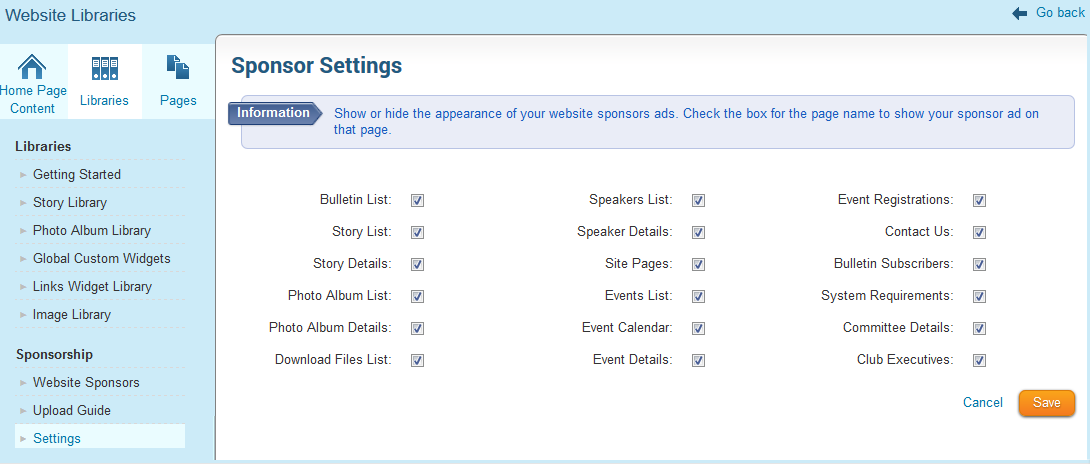 The Sponsorship module allows clubs to place text or image sponsor ads on their own website as a means of generating revenue. Clubs have always had the ability to display these ads on the homepage, bulletin and on all subsequent secondary pages. As our way of providing you with more custom options, you now have more control over which secondary pages you want these ads to display on, including the photo album list, speakers list, speakers details page, event details page and more.
To view the complete list and choose which pages to display the ads on, click on the Sponsor Settings link from the Sponsors page. If the option for subsquent pages is turned off, the content on those pages will expand across what would have been the reserved right column meant for those ads.
We're constantly making improvements to the ClubRunner platform and would love to hear your feedback and suggestions on what you'd like to see. Email us at feedback@clubrunner.ca with your suggestions!
The Sponsorship module allows clubs to place text or image sponsor ads on their own website as a means of generating revenue. Clubs have always had the ability to display these ads on the homepage, bulletin and on all subsequent secondary pages. As our way of providing you with more custom options, you now have more control over which secondary pages you want these ads to display on, including the photo album list, speakers list, speakers details page, event details page and more.To view the complete list and choose which pages to display the ads on, click on the Sponsor Settings link from the Sponsors page. If the option for subsquent pages is turned off, the content on those pages will expand across what would have been the reserved right column meant for those ads.
We're constantly making improvements to the ClubRunner platform and would love to hear your feedback and suggestions on what you'd like to see. Email us at feedback@clubrunner.ca with your suggestions!
Friday, August 29, 2014
Tips for the Week!
Did you know you can control the appearance of your website on mobile devices?
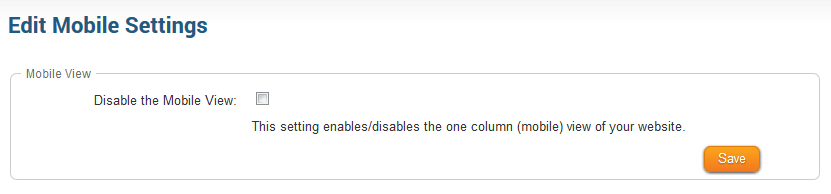 Based on your feedback, we have added more control around the appearance of your website on
mobile devices. You now have the option to enable/disable the one column view of your website on smart phones. The one column layout takes all the elements of your website and then presents it in one column taking the width of your phone screen into account. If you disable this option, then the website layout will match that of your site when viewed on a desktop or iPad.
To access this feature, navigate to the Website Designer 3.0 link and then to the Settings tab. Click on "Edit Mobile Settings" and select your choice.
Did you know you can display member spouse birthdays on club bulletins?
You now have the ability to further customize the Birthdays and Anniversaries widget by being able display the birthdays of the spouses of members as well. To turn this option on, simply click on the cog wheel on the widget to navigate to the Properties page, from where you can select the "Show Spouse Birthdays" option.
Based on your feedback, we have added more control around the appearance of your website onmobile devices. You now have the option to enable/disable the one column view of your website on smart phones. The one column layout takes all the elements of your website and then presents it in one column taking the width of your phone screen into account. If you disable this option, then the website layout will match that of your site when viewed on a desktop or iPad.
To access this feature, navigate to the Website Designer 3.0 link and then to the Settings tab. Click on "Edit Mobile Settings" and select your choice.
Did you know you can display member spouse birthdays on club bulletins?
You now have the ability to further customize the Birthdays and Anniversaries widget by being able display the birthdays of the spouses of members as well. To turn this option on, simply click on the cog wheel on the widget to navigate to the Properties page, from where you can select the "Show Spouse Birthdays" option.
Friday, July 25, 2014
Tips for the Week - MyEventRunner Edition!
 Did you know you can create vouchers using the new templates found in MyEventRunner?
We've added a new template for name tags to the "Prepare Name Tags" section in MyEventRunnner! This new template allows event chairs to create vouchers for meals, tickets, etc. for registered attendees. Vouchers can be created and color coded based on payment status, packages and add-ons created under the same event and then can be exported into Word to print and distribute.
Did you know that you can issue online refunds for events created within MyEventRunner?
As part of our recent software update, you now have the ability to issue an online refund for the original payment transaction that occurred for an event created with MyEventRunner. Depending on the payment processor, online refunds are applied right away. You will see a 'Refund' link appear next to the transaction on the Payment History screen. You simply follow the instructions as they appear on the screen, and you're done!
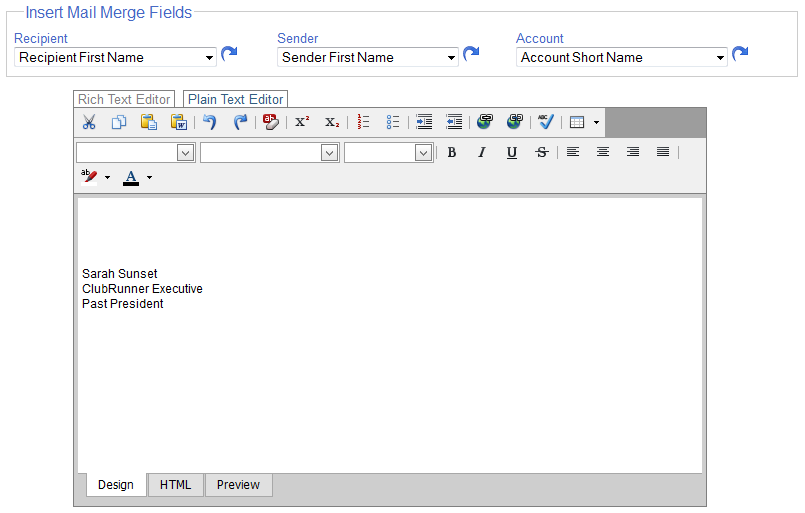
Did you know you can personalize your invitation emails using mail merge tags?
Similar to the mail merge fields found in the Email Message Center, event chairs emailing registrants through MyEventRunner can use mail merge tags to populate information in their emails such as name, recipient spouse name, club name, sender name, account name, etc.
These are just some of the enhancements we've made to the MyEventRunner module, but there are still lots more on the way. To learn more about his feature, visit www.MyEventRunner.com.
Friday, July 18, 2014
Email Communications 3.0!
 A few months ago, we introduced our new and improved Email Message Center module on Version 3.0. At that time, we announced that we will be retiring the Email Message Center 2.0 on July 24, 2014. Post this date, when you navigate to the Email Message Center 2.0 and click on "Compose New Message" you will be taken to Version 3.0. You will still have access to your emails and drafts in Version 2.0 and can migrate them to the new platform.
Not only is the Email Message Center 3.0 faster but it also allows you to have more control over your emails. Upon logging in, you will notice a new link on the Admin Page titled "Email Message Center (New)" under the My ClubRunner section. You can transfer over your emails from the old Version 2.0 system to this by clicking on the "Migrate Emails" button. This will automatically transfer all the emails and drafts that were created in the past 3 months.
Create and send customized message templates easily, attach larger files (limit increased to 6MB), continue to manage your distribution lists, add images to your emails from directly from your desktop or image library and even style your text using the options available. With the new AutoSave feature, your emails will be saved every 90 seconds, so you'll never have to worry about losing your drafts.
For any questions on this new module, please do not hesitate to contact our support team.
Saturday, July 12, 2014
It's a brand new Rotary year!
 It's a new Rotary year and we wanted to take this opportunity to congratulate everyone in their brand new roles. Whether you've been elected to become the club President, Secretary, Treasurer, Webmaster, PR Chair, Membership Chair, or are just a regular member, we want to do everything in our control to enable your success this year as well as ensure your satisfaction with us, so that you can focus on helping 'light up Rotary'.
Over the past little while, we've made a lot of exciting updates to make the jobs of your members easier, no matter what their role in the club may be. From releasing our newest Rotary branded website and bulletin template, which was released in conjunction with Rotary's digital guidelines to our integration with Quickbooks; from releasing Email Communications Version 3.0 to more customization options for the Club Bulletin, there is a whole lot for everyone. You can stay on top of the latest updates and new feature releases by following our service updates, which occur bi-weekly on Thursday mornings. Subscribe to the service updates RSS feed and get the latest news delivered directly to your inbox.
Support at your fingertips

If at any time, you need more information on how to use a certain feature or have general questions about ClubRunner, we invite you to visit our Support Center at www.ClubRunnerSupport.com. Here you will find links to our:
- On-demand tutorial videos
- Help guides
- Service updates
- Training webinars schedule
- Frequently asked questions
As always, please continue to send us your feedback, feature requests and suggestion by emailing us at feedback@clubrunner.ca. We look forward to serving your club this brand new Rotary year!
Saturday, June 28, 2014
Run your non-profit as a business, not a hobby
Recently, our very own team member, Divya published an article on LinkedIn about the struggles non-profits know all too well, when it comes to growth. At ClubRunner, working with non-profit groups, we've seen this firsthand ourselves.
An excerpt from the article:
 Despite the wide range of what non-profits do, they all have a striking similarity in their struggle to grow and prosper. The root cause is the misguided mindset that they are "non-profit" rather than "for-profit". These labels only apply to the financials, but should not affect the way they operate or present themselves. I've seen first hand evidence of even the smallest groups achieve big goals simply by changing their toolkit!
The biggest obstacles preventing non-profits from growing and reaching their goals are neither budget nor a lack of manpower; rather it is their mindset and way of thinking. I found that the executives were unable to look past limitations and road blocks. Moreover, many of them simply saw themselves as volunteers and part-timers and believed that success was merely a matter of more time and resources. As a result, they were resigned to achieving small incremental changes. While this is understandable, I started thinking if we could make more of an impact by adopting strategic business elements. The more I thought about it, the more I was convinced that we simply needed to embrace the mantra, ‘think like a business’. Non-profits play an integral role in community service projects but it isn’t just a matter of organizing a few fundraisers.
An excerpt from the article:
Despite the wide range of what non-profits do, they all have a striking similarity in their struggle to grow and prosper. The root cause is the misguided mindset that they are "non-profit" rather than "for-profit". These labels only apply to the financials, but should not affect the way they operate or present themselves. I've seen first hand evidence of even the smallest groups achieve big goals simply by changing their toolkit!The biggest obstacles preventing non-profits from growing and reaching their goals are neither budget nor a lack of manpower; rather it is their mindset and way of thinking. I found that the executives were unable to look past limitations and road blocks. Moreover, many of them simply saw themselves as volunteers and part-timers and believed that success was merely a matter of more time and resources. As a result, they were resigned to achieving small incremental changes. While this is understandable, I started thinking if we could make more of an impact by adopting strategic business elements. The more I thought about it, the more I was convinced that we simply needed to embrace the mantra, ‘think like a business’. Non-profits play an integral role in community service projects but it isn’t just a matter of organizing a few fundraisers.
Read the rest of the article here and share your thoughts with us! We'd love to hear your opinion!
Friday, June 6, 2014
Tips of the Week!
Did you know that you can add custom fields to your club reports?

Clubs can now include custom fields that they've created for member profiles in reports they build with the eDirectory builder! An additional source type called 'Custom Fields' has been added to the "Column Designer" screen. Upon navigating to the Column Designer, from where you can add more data sources to appear in your report, you can select, custom fields as a choice and then select which field you want added to the report.
 Did you know you can now format custom page titles to customize their style, look and feel?
To give you more control over formatting, we've made it simpler to format Custom Page titles. Similar to the option available for Stories, you will now see a "Format Options" link next to the title field. Clicking on it will open a new editor window from where you will be able to easily bold, italicize, underline, change the font, colour and size of your title.
These are just some of the new features we've recently added! Have suggestions you'd like to share with us? Send them to us at feedback@clubrunner.ca
Clubs can now include custom fields that they've created for member profiles in reports they build with the eDirectory builder! An additional source type called 'Custom Fields' has been added to the "Column Designer" screen. Upon navigating to the Column Designer, from where you can add more data sources to appear in your report, you can select, custom fields as a choice and then select which field you want added to the report.
To give you more control over formatting, we've made it simpler to format Custom Page titles. Similar to the option available for Stories, you will now see a "Format Options" link next to the title field. Clicking on it will open a new editor window from where you will be able to easily bold, italicize, underline, change the font, colour and size of your title.
These are just some of the new features we've recently added! Have suggestions you'd like to share with us? Send them to us at feedback@clubrunner.ca
Subscribe to:
Posts (Atom)